Webshare Review
Webshare is the go-to choice for nearly 60,000 paying users and even Fortune 500 companies. It’s probably safe to say the provider knows what it’s doing.
What distinguishes it from other proxy vendors? 10 free IPs for every registered user would be the obvious answer. Other than that, Webshare is cheap (though not always) and extremely customizable, with powerful self-service features.
But can this provider do what you need? We tested Webshare’s datacenter and residential proxy networks to find out!
Get 50% off your first purchase.
3-Minute Human Summary
- Webshare’s main products are datacenter and ISP (static residential) proxies in shared or dedicated lists. They cover six continents, and you can buy as few as one or as many as 10,000 IPs.
- The provider is known for its flexible features, many of which are upsells. For example, you can choose how many individual IPs you’ll be able to replace, or refresh the full proxy list as often as every five minutes. Optional IP rotation comes included free of charge.
- The residential proxy network is also worth a look: it’s one of the larger in the market (our benchmark found over 500k US IPs) and performs very decently. However, it lacks UDP support, if you need it.
- Webshare costs way below the market average, as long as you’re careful with the upsells. As a result, you can get many decent IPs cheaply. The free plan gives a generous 1 GB monthly allowance.
- The platform is suprisingly advanced with a wallet, great usage tracking tools, a powerful API that replicates the dashboard’s functionality, and sub-users.
- Overall, Webshare is a great choice if you’re looking for a strong developer experience or the flexibility this provider can give you.
News about Webshare
-
By Adam Dubois
- Provider News
-
- Provider News
General Information
- Country: United States
- Founded: 2018
- Employees (LinkedIn): 25-50
- Proxy networks: Datacenter, ISP, residential
- Supporting tools: Chrome extension
- Price segment: Entry/mid-market
- Payment methods: Credit card, Google Pay, Apple Pay
- Trial: Free plan with 10 datacenter IPs
Webshare is a Silicon Valley-based proxy provider founded in 2018. In late 2022, it was acquired by Oxylabs, one of the biggest names in the field. Despite that, Webshare continues operating as a separate entity.
The provider began by selling datacenter proxies. To this day, they remain the driving force behind the service. According to our annual survey, ISP proxies have also grown to play a significant role in the company’s line-up.
Webshare positions itself as an affordable proxy vendor – especially if you’re looking for many server-based IPs. As such, it primarily targets entry to medium clients, drawing them in with the free plan. The provider manages datacenter proxies in-house and likely uses Oxylabs’ infrastructure for residential IPs.
As a company, Webshare can be considered mid-sized. It’s been growing fast and employed 32 people in March 2026, or a quarter more more than the year before.
Webshare Proxy Networks
Webshare offers three kinds of proxy servers: datacenter, ISP, and residential. Use the tabs to learn about their features, pricing, and performance in more detail.
🏢 Datacenter & ISP Proxies
Datacenter proxies are Webshare’s flagship product with IPs in nearly 50 locations. ISP proxies have similar specifications but work better due to their association with residential internet service providers. This is a growing service set to gradually take over.
Both proxy networks come in three formats: shared with many, shared with a few, or dedicated to your exclusive use. Webshare’s terminology is misleading because it calls its semi-shared proxies private.
The products are similar in many ways, so we’ll cover them together.
🏢 Datacenter proxies
- Formats: Shared, semi-shared, dedicated list
- Countries: ~45 in six continents
- Rotation: Available in all formats, optional
- Other features: IP refresh interval, # of manual IP replacements, high concurrency, network priority, 0 fraud score
- Starts from: $2.99 for 100 shared IPs & 250 GB. Free plan with 10 IPs & 1 GB/mo available
🏢🏠 ISP proxies
- Formats: Shared, semi-shared, dedicated list
- Countries: ~15 in four continents
- Rotation: Available in all formats, optional
- Other features: IP refresh interval, # of manual IP replacements, high concurrency, network priority, 0 fraud score
- Starts from: $6 for 20 shared IPs ($0.3/IP) & 250 GB
- Pool size: Based on purchased IPs
- Countries (July 2026)
- Datacenter: ~45 in six continents
- ISP: ~17 in five continents
- Integration method: IP list / gateway server
- Targeting: Country level
- Distribution: Free country selection during purchase, random subnets
- Replacement
- Free: 10 IPs/mo, auto replacement on proxy downtime, low country confidence
- Paid: more individual IP replacements, manual and automated list changes
- Rotation: Every request / static
- Traffic: 250 GB / 1 TB/ 5 TB / unlimited
- Concurrency: 500 to thousands of threads
- Protocols: HTTP, SOCKS5 (no UDP)
- Authentication: Credentials, IP whitelist
- Sub-users: ✅
- Other: High network priority, 0 fraud score
Webshare’s datacenter proxies are available in around 45 locations. The number depends on stock availability. You can choose from six continents – mostly Europe, but there were even several African countries when we checked. The bulk of the IPs, however, was based in the US (in July 2026, there were 128k shared, 25k private, and 20k dedicated US IPs available).
The ISP proxies have less coverage: all three variations offer around 17 countries to choose from, mostly European. Once again, US had the largest stock of IPs when we checked: between 3k and 30k per variation.
You can specify how many IPs you want from each country or go ahead and choose random distribution.
Webshare gives 10 individual IP replacements for free. There’s an option to set up free automatic IP changes when a proxy experiences 15+ minutes of downtime or when an IP has low country confidence.
If that’s not enough, Webshare offers extremely flexible replacement features as paid add-ons. You can opt for automatic list refreshes that range between a month and every five (!) minutes, up to 50 manual refreshes or 5k individual IP replacements. Furthermore, you can choose to only replace IPs from the same IP range, ASN, or country.
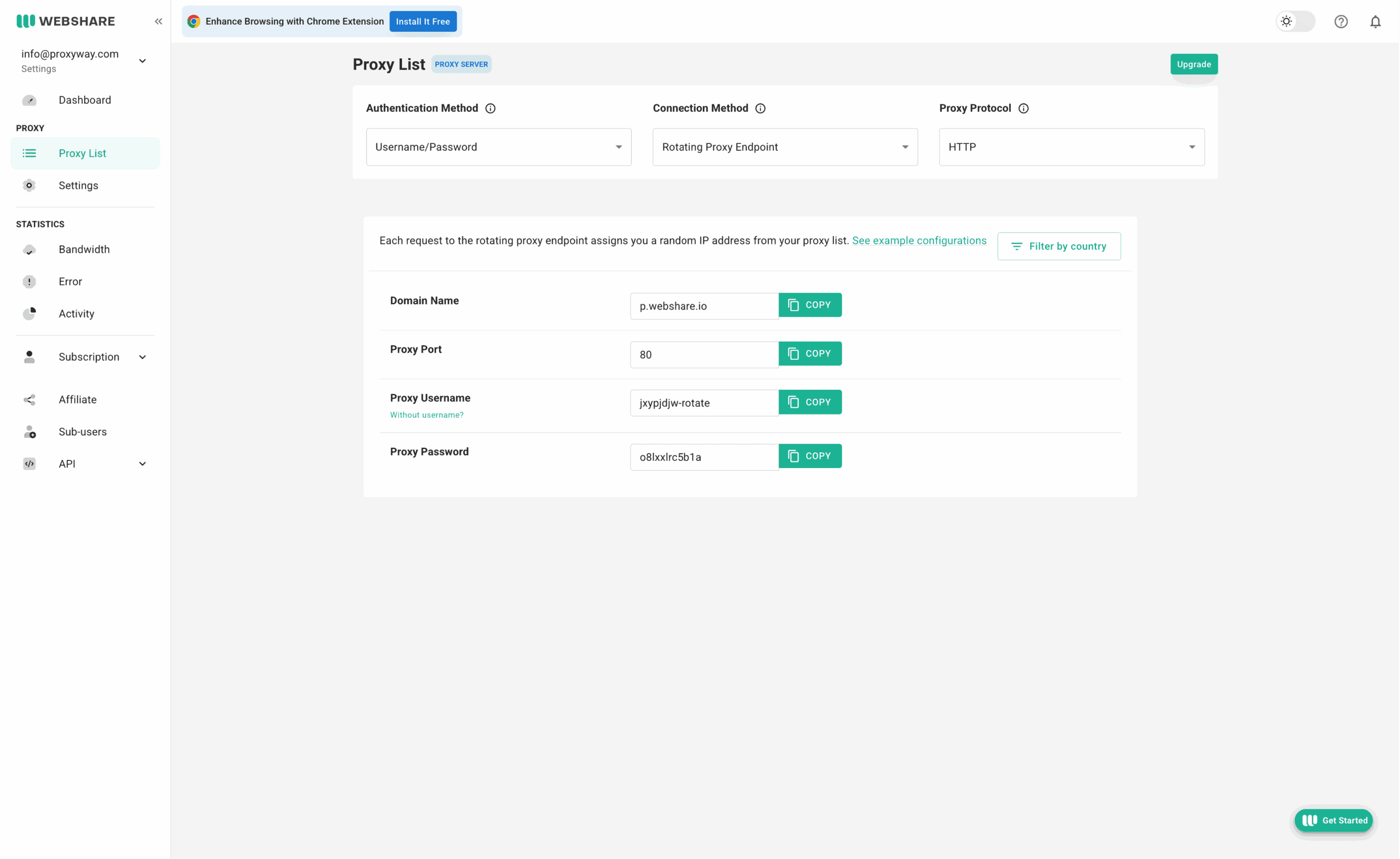
Webshare’s proxy servers can integrate directly as a simple proxy list, or using a backconnect gateway address. In theory, the list should be faster (fewer middlemen), but it doesn’t rotate.
The gateway option gives Webshare’s proxies the ability to rotate. The default is rotation with every connection request. Webshare has settings for modifying the session timeout (how long a proxy connection can keep running) and idle timeout (how fast the IP will rotate when inactive).
Unlike many other datacenter proxy vendors, Webshare takes a modular approach to functionality. The base configuration limits traffic and threads, and you can increase or even lift these limits by paying extra. There’s also an interesting checkbox that gives you network priority over other users, potentially decreasing latency.
If you want, you can also create sub-users. Three slots are given by default, but it’s possible to buy up to hundreds more at next to nothing.
Paired with Webshare’s IP replacement options, this flexibility enables interesting configurations. For example, you can get a plan with ten proxies and choose to automatically refresh the list every ten minutes. This will give you access to a large pool of IPs over time. It’s great to have so much choice.
- Model: Subscription
- Format: Pay per IP
- Starting price
- Shared datacenter: $2.99 for 100 IPs & 250 GB ($0.03/IP)
- Dedicated datacenter: $1.4 for 1 IP & 250 GB
- Shared ISP: $6 for 20 IPs & 250 GB ($0.3/IP)
- Dedicated ISP: $3.5 for 1 IP & 250 GB
- Upsells: More traffic, threads, IP refreshes, network priority, sub-users, 0 fraud score
- Trial: 10 free proxies with 1 GB per month
Webshare uses a subscription-based pricing model, but it isn’t quite the same as what customers are used to seeing. That’s because you get full control over your subscription.
The price considers not only the number of proxies you buy but also bandwidth, refreshes, and additional features like network priority. The cost for each modifier differs: for example, high concurrency adds 38% to the price, while the next traffic tier (250 GB -> 1 TB) charges 50% more.
Here are all the upsells you can choose:
- More traffic (250 GB by default in all configurations)
- Automatic replacements (up to every 5 minutes)
- Manual replacement (up to 5,000, 10 by default)
- High concurrency (500 by default)
- High network priority
- 0 fraud score
- Unlimited IP authorizations
An IP’s cost can be absurdly low, letting you buy 100 shared IPs for less than 3 cents each. But at this point, you’ll probably want more traffic and threads, in which case the cost rises to more respectable $.21/IP.
While Webshare has a list of plans it recommends, you can also get a custom amount of proxies – sometimes as few as one. There are price floors in place, so this approach is often less economical than going large.
All in all, Webshare’s prices are extremely affordable if you’re careful with the extra functionality. When fully decked-out, the dedicated proxy servers rival premium providers like Oxylabs and Bright Data in price. Even then, they tend to scale well.
We last tested Webshare’s datacenter proxies in April 2026. Our package included 50,000 shared IPs in the US.
Infrastructure performance
Target: Nearest server of a global CDN (~6 KB page size)
Requests: 70,000 over 7 days
Our server location: US
| Gateway | Avg. success rate | Response time (avg/median/P95) |
| US | 99.93% | 0.67 s / 0.60 s / 1.06 s |
The datacenter proxies rarely failed on their own, which met our expectations. They weren’t terribly fast, but we used Webshare’s rotating gateway feature, and it may have added some overhead.
Download speed
Target: Hetzner’s 100 MB Ashburn benchmark
Proxies tested: 10
| Avg. without proxies | Average | Median | Slowest IP |
| 353.91 MB/s | 19.02 MB/s | 18.90 MB/s | 0.90 MB/s |
Webshare’s datacenter proxies were more than fast enough for opening websites and respectably nippy for more bandwidth-intensive tasks like downloading videos.
- Basic format: IP:Port
- Gateway server
- Rotating: USERNAME-rotate:[email protected]:80
- Sticky sessions: USERNAME-1:[email protected]:80, USERNAME-2…
- IP whitelisting: p.webshare.io:10000, 10001, 10002…
The proxy list integration is straightfoward. If you choose the backconnect method, Webshare will give you one gateway and port number, and then you’ll choose different IPs by modifying the username: USERNAME-1, USERNAME-2, and so on. Rotation with every connection request adds -rotate to the username.
Authentication through an IP address generates different port numbers for each IP, without you needing to enter a username and password. This applies both to direct and gateway connections.
🏠 Residential Proxies
A competent but rather barebones proxy network sourced from real people around the world. Here, you pay for traffic and get access to the full proxy pool.
- Advertised pool: 80M IPs
- Countries: 195+ with state, city, ASN & ZIP code targeting
- Rotation: Every request, customizable sessions
- Starts from: $3.5 for 1 GB
- Advertised proxy pool: 80 million IPs
- Countries: 195+
- Integration method: Gateway address
- Filtering
- Random: ✅
- Country: ✅
- City: ✅
- ASN/ISP: ✅
- Other: State, ZIP code
- Rotation
- Every request: ✅
- Sticky sessions: ✅ (as long as available)
- Session behavior: New IP after disconnect, customizable inactivity timeout
- Protocols
- HTTP: ✅
- HTTPS: ❌
- SOCKS5: ✅ (no UDP)
- Authentication
- Credentials: ✅
- IP whitelist: ✅
- Sub-users: ✅
- Concurrency: 500 with an optional upgrade
- Traffic: Plan based
Webshare advertises 80 million IPs from real devices. Of course, this being a residential proxy network, only some of the proxies are available at a given time.
You can choose from most locations around the world, with the option to further specify a state or city. Since summer 2026, ASN targeting is also available, bringing Webshare to feature parity with competitors.
Like all residential proxy networks, Webshare uses a backconnect gateway address. You send requests to it, and the gateway automatically chooses which end-user IP to connect through. The provider has multiple gateways in the US and other countries to relay requests efficiently.
Webshare’s residential proxies can rotate with every connection request, and it’s also possible to establish sticky sessions. However, you can’t choose their custom duration.
The default configuration gives you 500 threads to work with. The number isn’t high, but it’s possible to increase it by paying extra. In the same way, you can enable network priority, which in theory should make the connection faster.
SOCKS5 is available, but it routes only TCP traffic.
- Model: Subscription (monthly, yearly)
- Format: Traffic
- Modifiers: More threads, sub-users/whitelisted IPs, network priority
- Starting price: $3.5 for 1 GB
- Trial: ❌
With the residential proxies, you won’t pay per IP; instead, Webshare charges for traffic. The price depends on additional features like network priority, threads, and unlimited IP authorization.
Webshare used to charge the same price per unit ($15/GB) as premium providers like Oxylabs and Bright Data. But after several price cuts, it now stands next to the affordable companies like Decodo and IPRoyal.
Getting a yearly plan reduces the price by a further 30%, making Webshare even more affordable.
We last tested Webshare’s residential proxies in April 2026, for our annual proxy market report.
Pool size & composition
| Gateway | Requests | Unique IPs | Residential %* |
| Global | 3.6M over 21 days | 1,745,672 | 98.88% |
| US | 1.2M over 14 days | 515,736 | 98.77% |
| UK | 560k over 14 days | 168,717 | 98.61% |
| EU** | 1.2M over 14 days | 403,257 | 98.54% |
| Brazil | 560k over 14 days | 433,923 | 99.07% |
| India | 560k over 14 days | 429,282 | 98.17% |
| Australia | 140k over 7 days | 31,549 | 98.65% |
* IP2Location database, Usage type data point (ISP, ISP/MOB, MOB IPs)
** Combines Germany, France, Spain, Italy, the Netherlands.
Top 10 countries in the Global pool

Comparison with other providers
Webshare’s residential proxy network was above average in size, with good coverage of Tier 1 countries like the US. It was also predominantly residential, as advertised.
Infrastructure success rate
Requests: Same as the pool test
Target: Nearest server of a global CDN
| Gateway | Avg. success rate |
| Global | 99.28% |
| US | 98.92% |
| UK | 99.02% |
| EU | 99.25% |
| Brazil | 99.58% |
| India | 99.48% |
| Australia | 99.57% |
Comparison with other providers
Our requests succeeded over 99% of the time in all scenarios, showing that the infrastructure had no serious downtime over three weeks and is stable for continuous use.
Infrastructure response time
Requests: 6 KB page size – same as the pool test, 2 MB page size – 5,000
Target: Nearest server of a global CDN
6 KB page size
| Gateway | Avg. | Median | P95 |
| Global (🇩🇪 -> any IP) | 0.86 s | 0.69 s | 1.66 s |
| US (Ashburn -> 🇺🇸 IP) | 0.94 s | 0.78 s | 1.80 s |
| UK (🇩🇪 -> 🇬🇧 IP) | 0.67 s | 0.51 s | 1.32 s |
| EU (🇩🇪 -> 🇩🇪/🇪🇸/🇫🇷/🇮🇹/🇳🇱 IP) | 0.65 s | 0.49 s | 1.33 s |
| Brazil (Ashburn -> 🇧🇷 IP) | 1.15 s | 1.04 s | 1.90 s |
| India (Singapore -> 🇮🇳 IP) | 1.68 s | 1.47 s | 1.33 s |
| Australia (Singapore -> 🇦🇺 IP) | 1.57 s | 1.38 s | 2.69 s |
2 MB page size
| Gateway | Avg. | Median | P95 |
| Global (🇩🇪 -> any IP) | 5.85 s | 2.88 s | 21.06 s |
| US (Ashburn -> 🇺🇸 IP) | 4.31 s | 2.07 s | 12.11 s |
Comparison with other providers
6 KB page size, average response time
While its proxy network has improved in this regard, Webshare remains behind the fastest providers. Still, its latency was very perfectly adequate for most uses. The main area where it could be improved is the Asia-Pacific region.
- Basic request: p.webshare.io:80
- Using filters: USERNAME-de-es-fr-it-us-rotate:[email protected]:80
- Establishing sessions: USERNAME-1:[email protected]:80
- Using IP whitelisting: p.webshare.io:9999, p.webshare.io:10000, 10001…
To access the network, you can use either credentials or whitelist an IP. The first option modifies the username to reflect your configuration: country filtering adds, for example, -us, and sticky sessions add a number. It’s interesting that you can select multiple countries at once – not every provider supports this.
Whitelisted IP authentication removes the need for a username and password. This way, you choose your settings on the dashboard (countries, rotation), and Webshare generates different ports for sticky sessions. It’s possible to have only one active configuration using the whitelisted approach.
How to Use Webshare
Registration
All products can be bought through self-service, so they won’t take long to set up. You’ll have to fill in a registration form, confirm your email, and you’re in.
Webshare supports signing up with Google or GitHub for easier access.
KYC & Usage Policies
Webshare doesn’t have a proactive KYC procedure. You’ll only have to undergo one if the system detects unusual activity or if you try to access financial websites. This policy makes Webshare easy to pick up, but it can (and, reading online feedback, does) make some users unhappy if they trigger verification.
In general, Webshare doesn’t provide a list of the websites it restricts – you’ll have to ask to find out.
Dashboard
Webshare’s dashboard includes everything you need to work with proxies. You can manage subscriptions, set up proxy servers, monitor usage, get help, and access the API. The dashboard includes a dark mode and is only available in English.
The dashboard’s main page shows basic information about the active subscription, as well as some usage statistics. More controls are reachable through the navigation bar on the left hand side. Webshare allows changing the time zone to wherever you are, which is a nice touch.
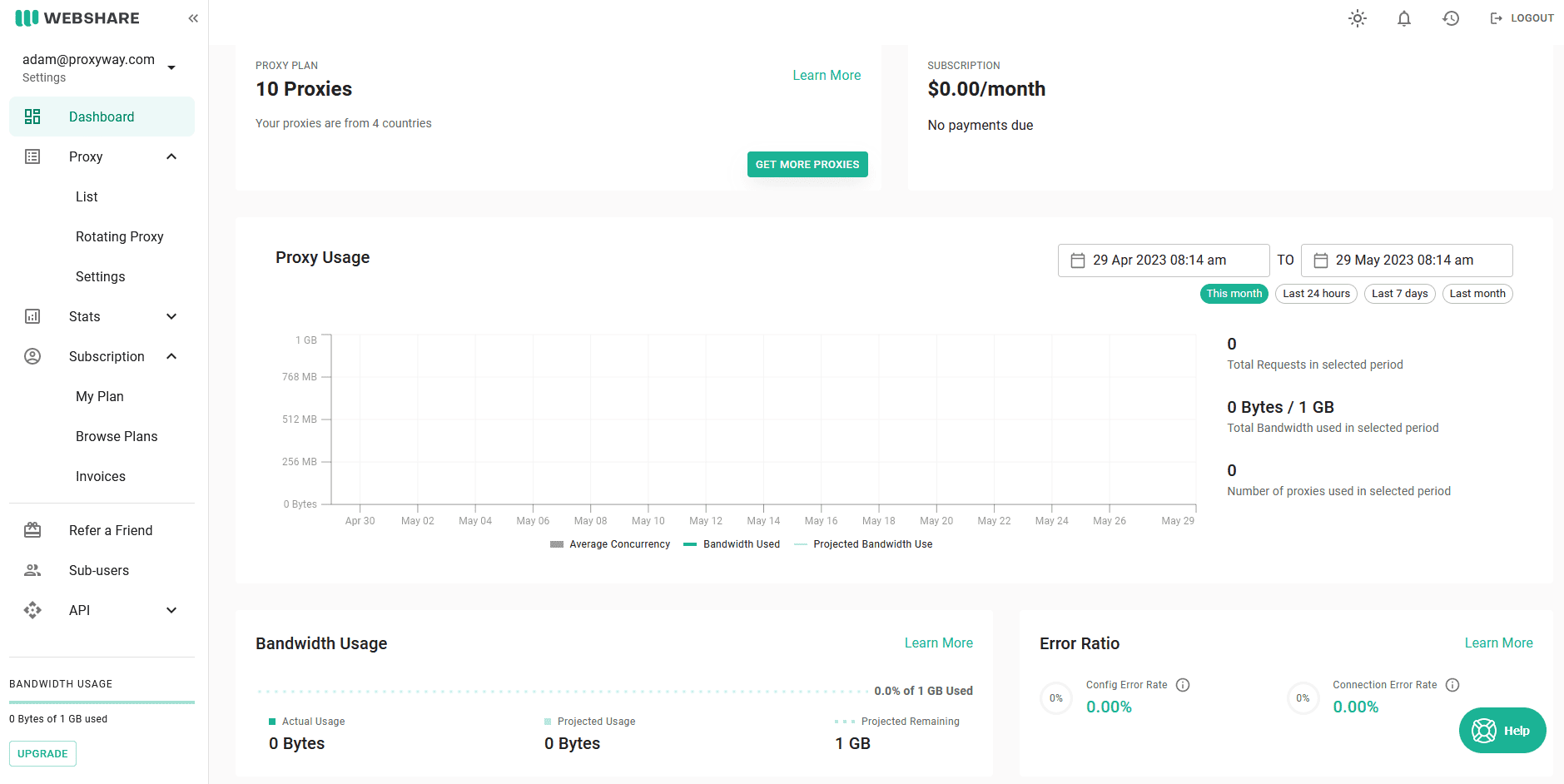
Since 2026, Webshare allows subscribing to several plans under one account. The caveat is that they must involve different products.
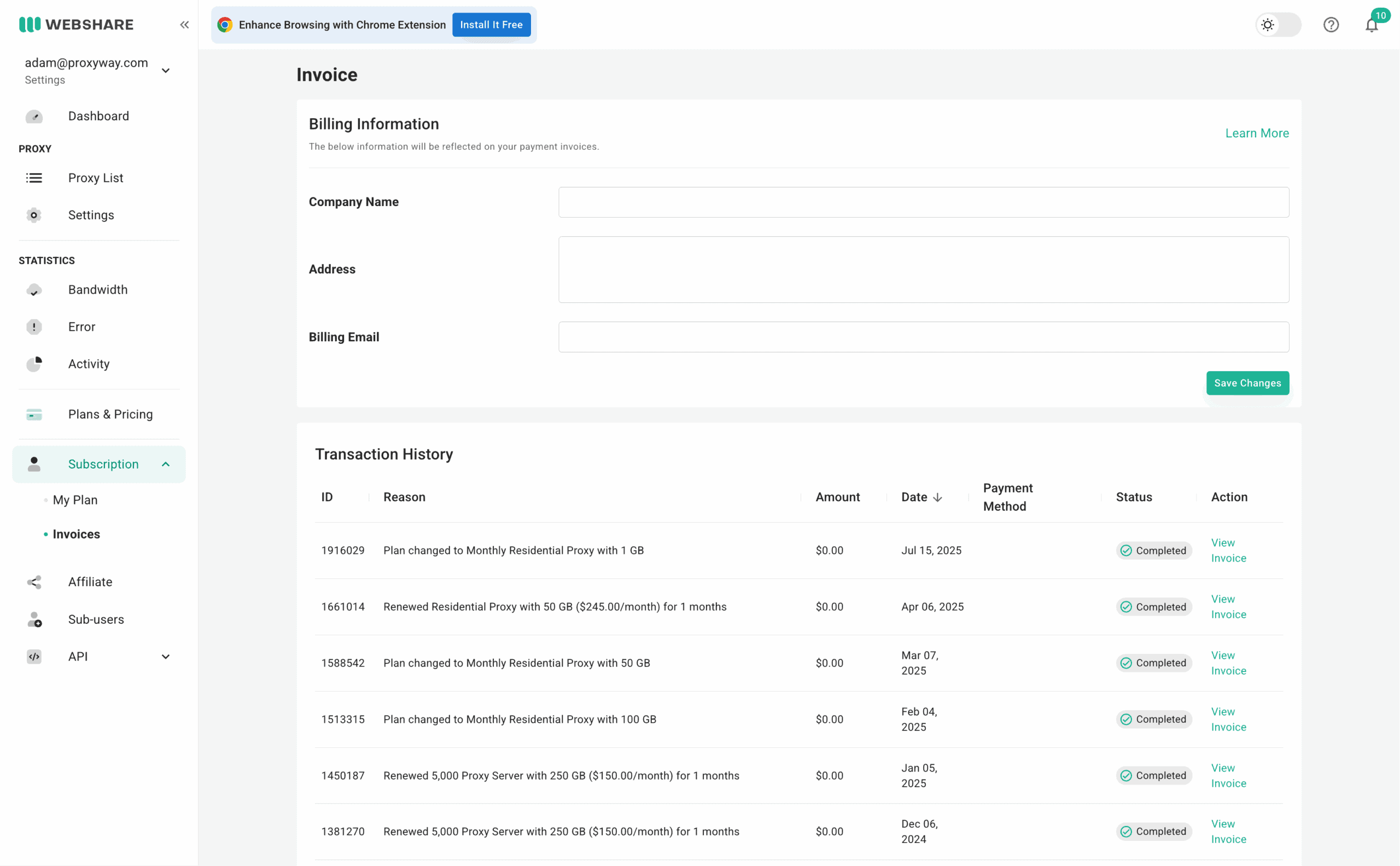
The dashboard lets you add billing and credit card information to simplify transactions. There’s wallet functionality where you can buy and use account credits, and a page containing the transaction history with downloadable invoices.
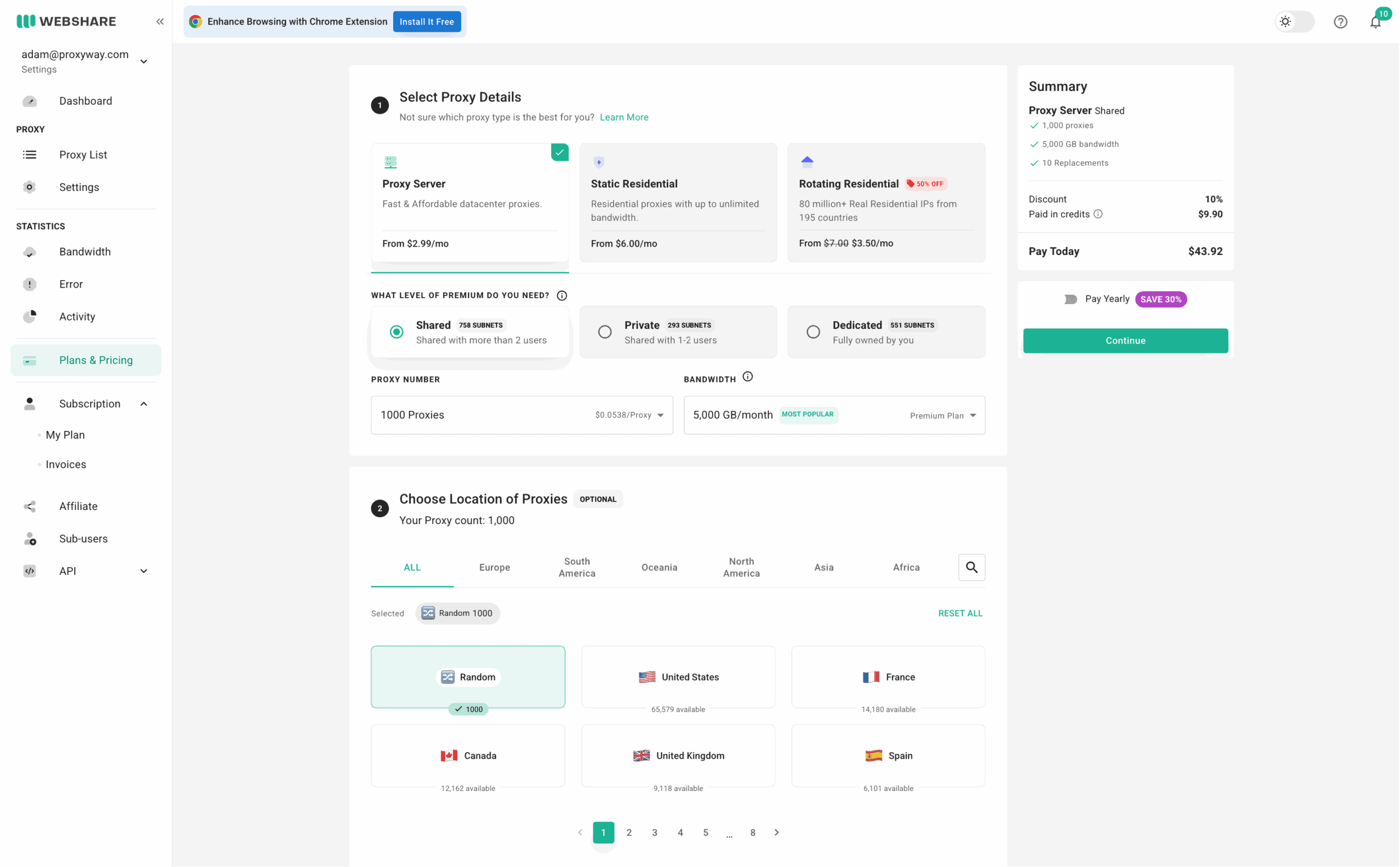
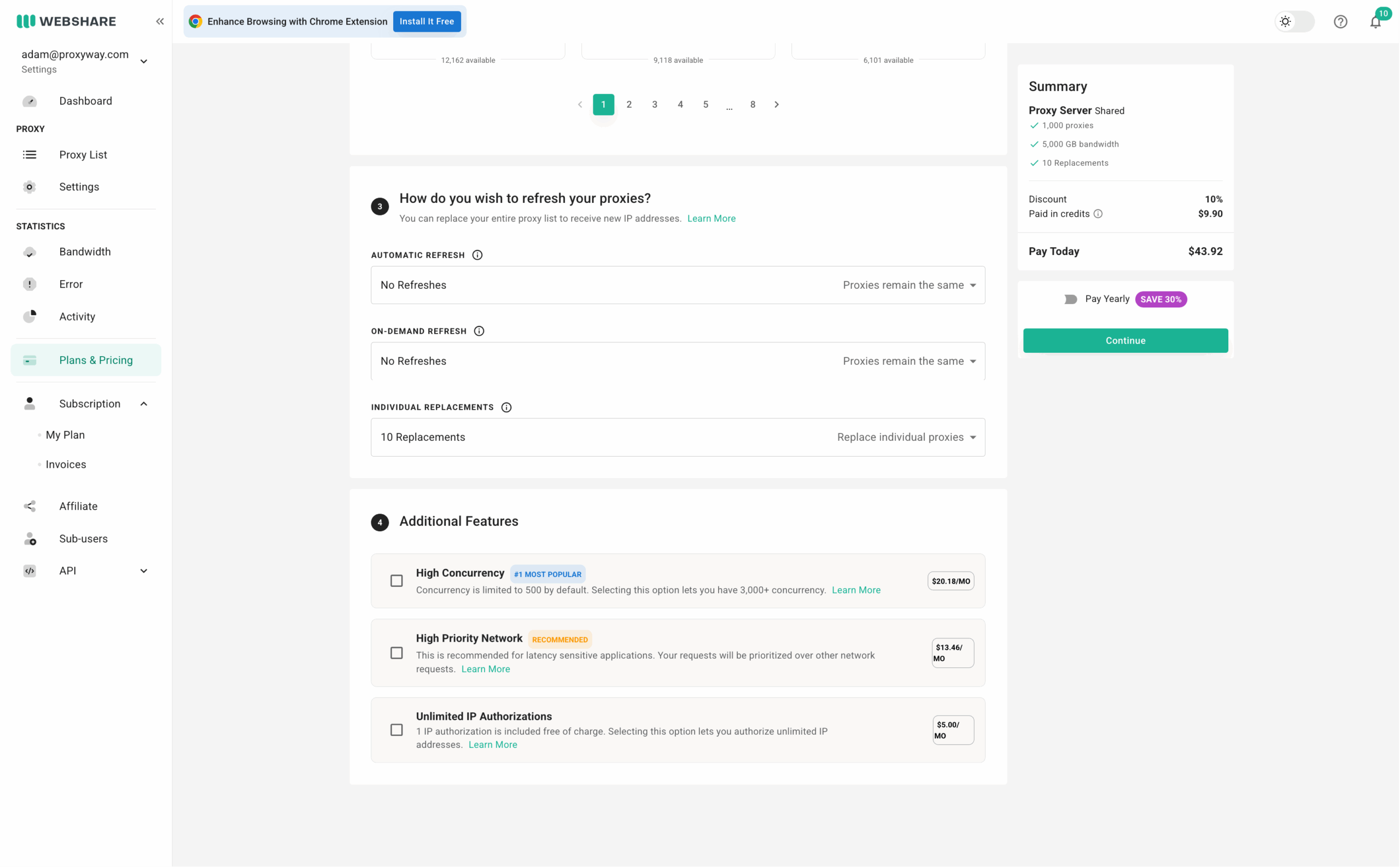
The provider supports complete self-service for all its proxies. The purchase process is divided into steps:
- Selecting the preferred proxy type and traffic allowance.
- Choosing IPs from the list of countries. Webshare shows how many IPs are available in each.
- Configuring the refresh options for server-based proxies.
- Deciding on optional features like more threads, network priority, and unlimited whitelisted IPs.
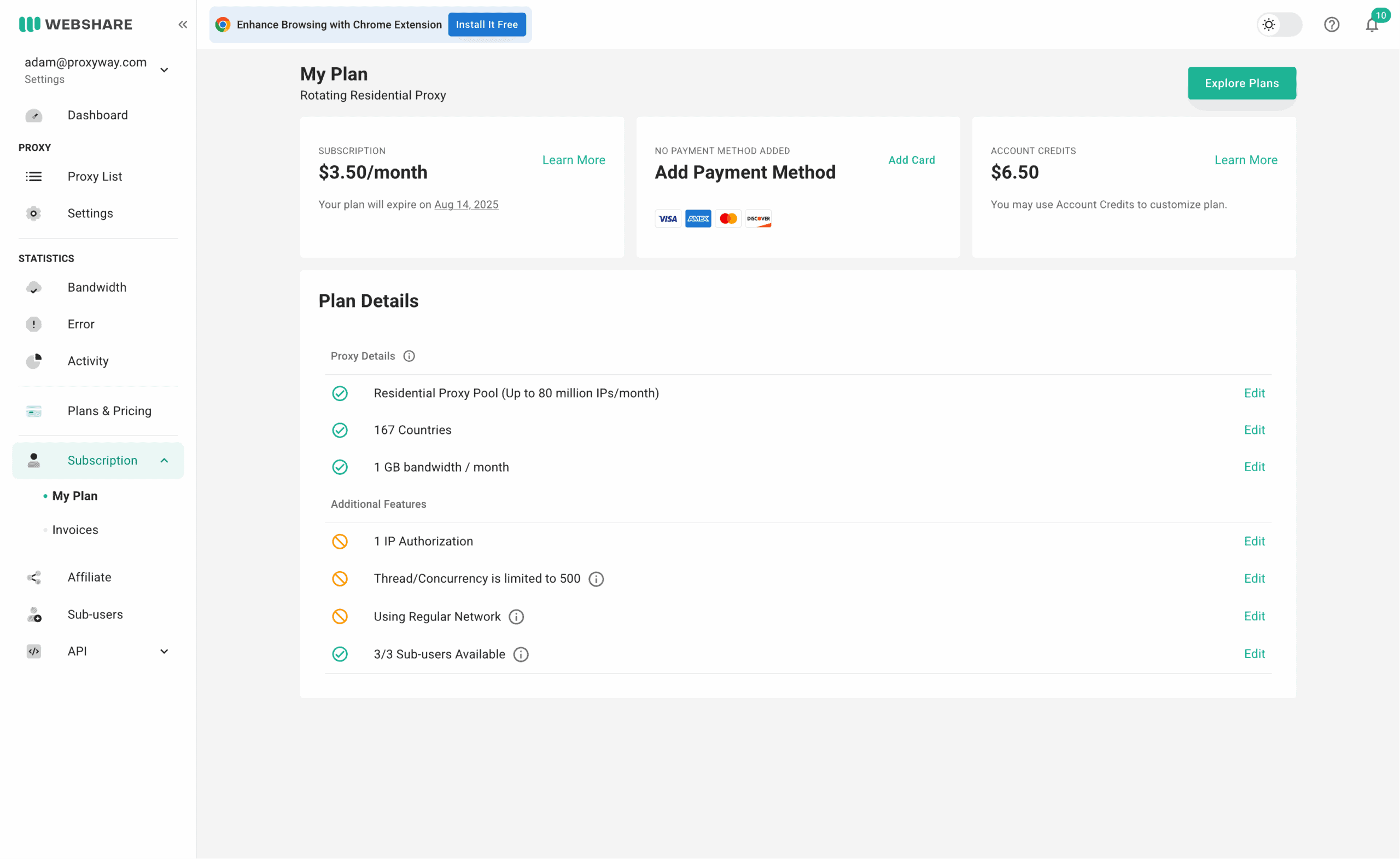
After you’re done building your plan, you can see all the necessary information under My Plan. It displays the fee, your wallet balance, and other plan details. In any case, you can customize your choices after the purchase, upgrading/downgrading the plan or switching to a different product altogether.
Platform access
The dashboard itself has few settings for controlling access: there’s no 2FA or team accounts. The only things you can do are change your email address, password, and delete the profile.
Proxy access
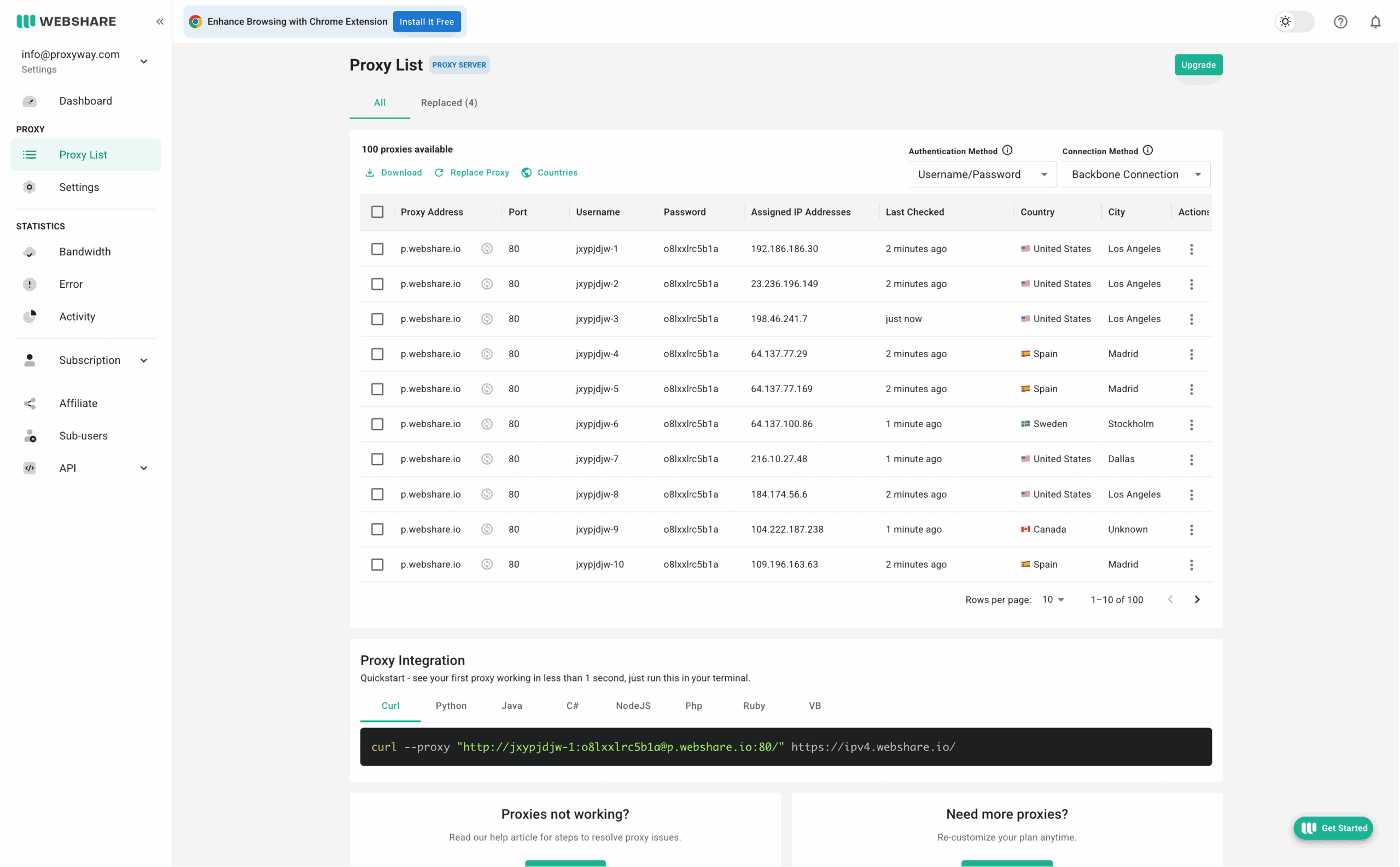
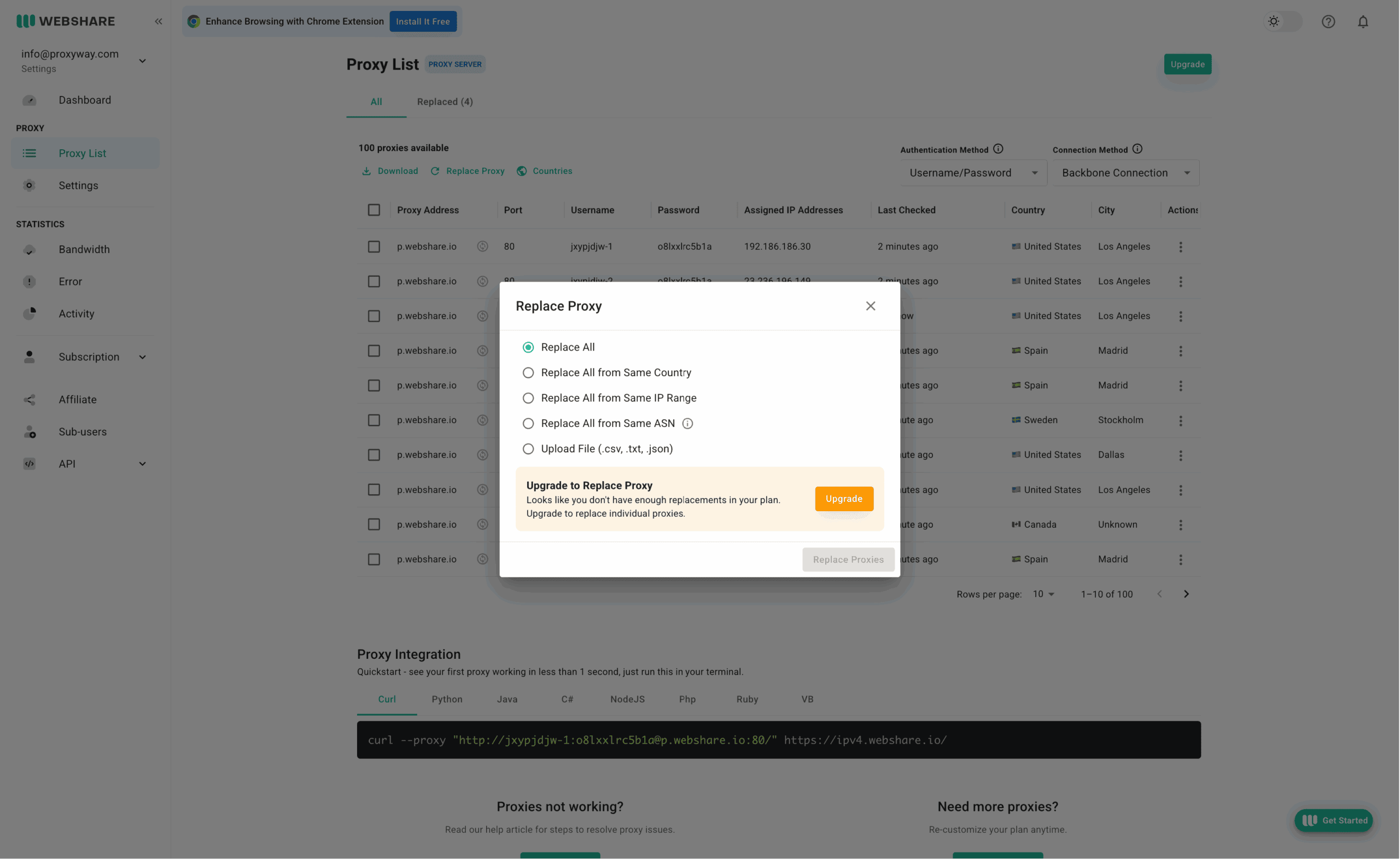
Setting up proxies on Webshare is easy enough. The Proxy List page holds all the IPs available in the plan. It shows their basic location information and when they were last checked. It’s also possible to replace IPs here and see the proxies you’ve already replaced in a separate tab.
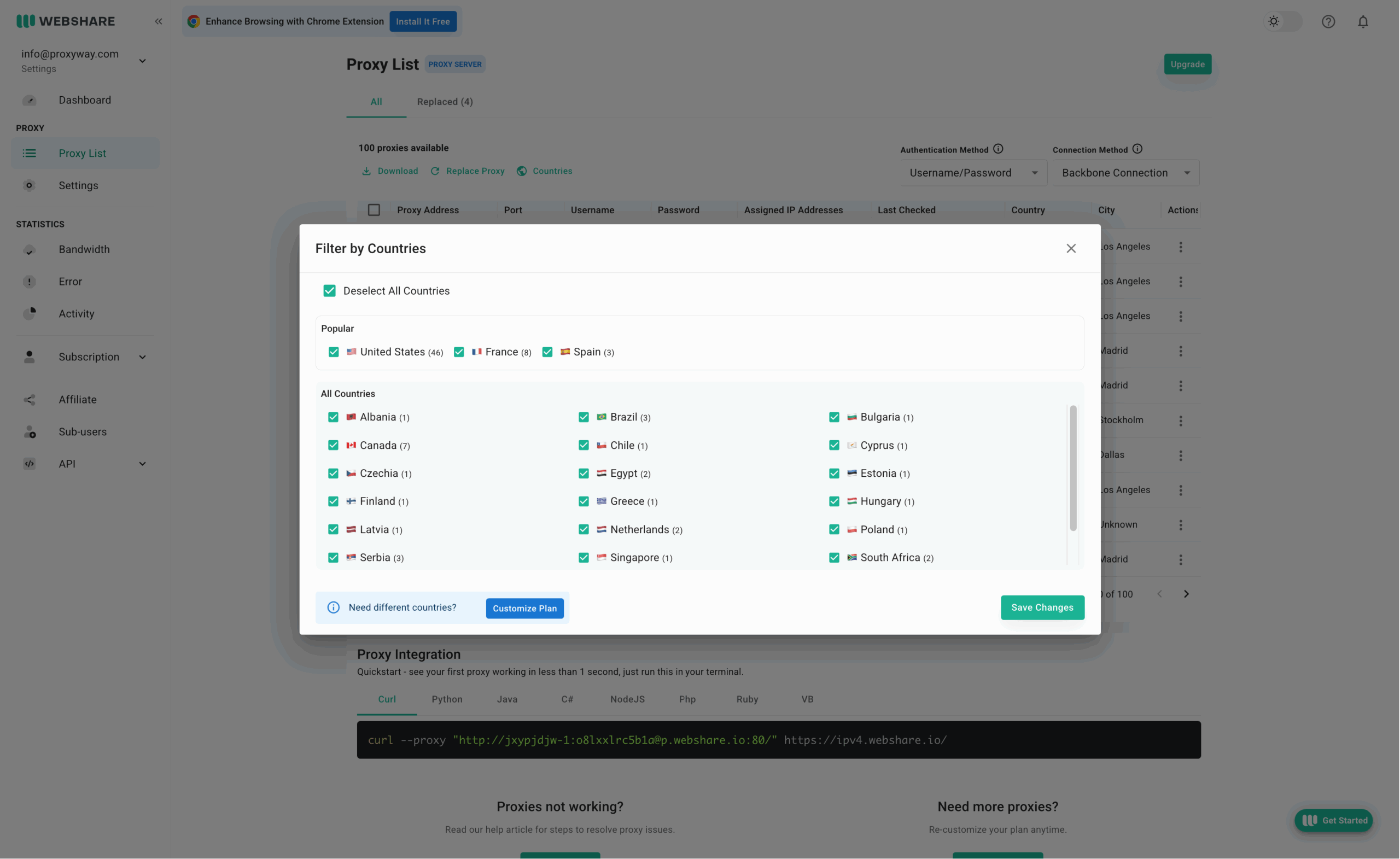
You can filter the list by country, select the authentication method, and the proxy presentation format: direct connection or a rotating gateway. Then, you simply download the full or partial list as a .txt file. Below the list, there are code samples in multiple programming languages.
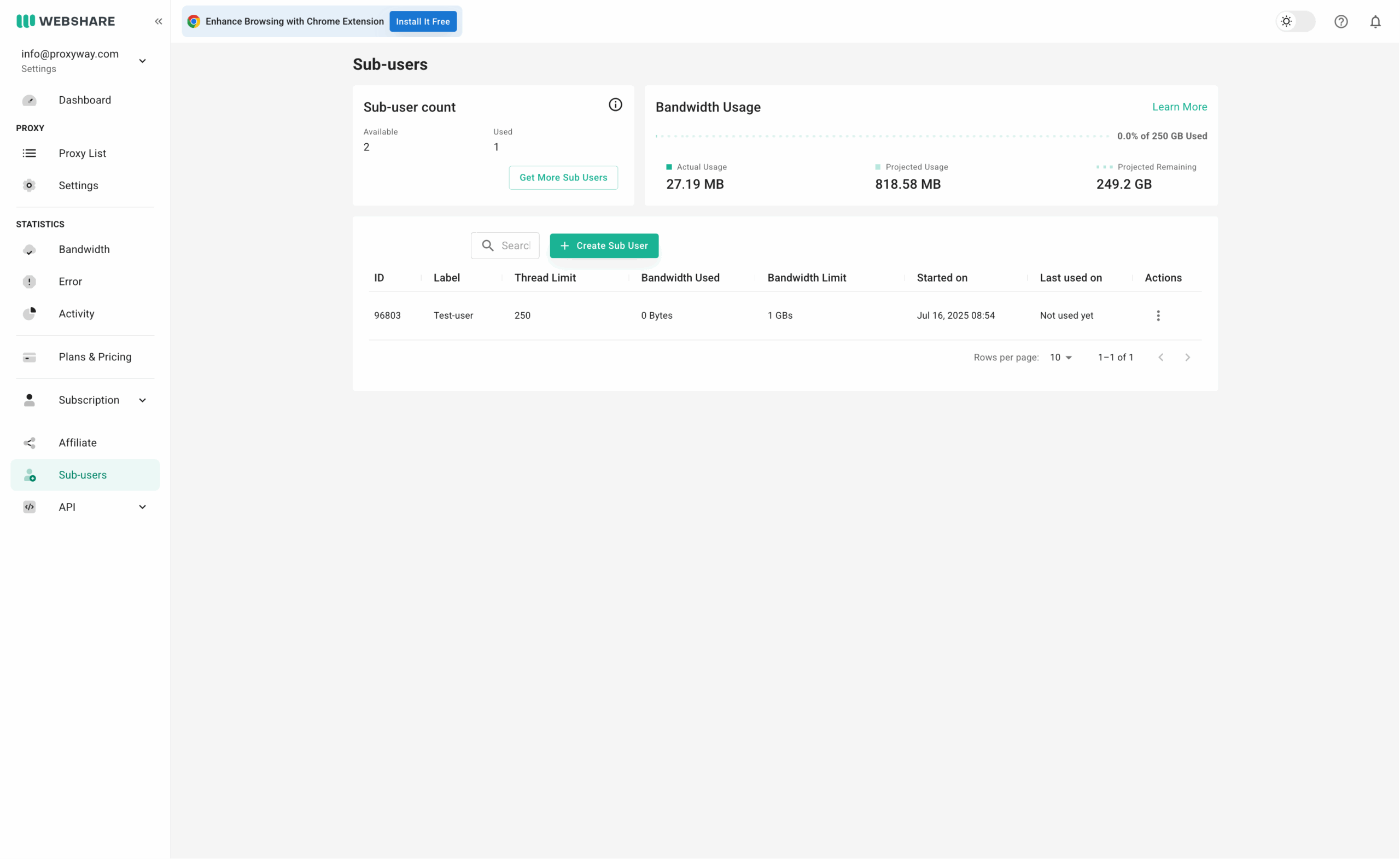
Sub-users are managed on a separate page. Webshare lets you add a label, traffic allowance, and thread limits. You can even create custom proxy lists for that user, for example, restricting it to particular countries.
IP whitelisting can be found on a different page. Session and idle timeout settings are on yet another, which makes the experience a little disjointed.
The setup widget works very well with datacenter and ISP proxy servers, but it can be a little awkward when residential proxies get involved. In addition, sub-users have their own setup widgets, which aren’t easily discoverable.
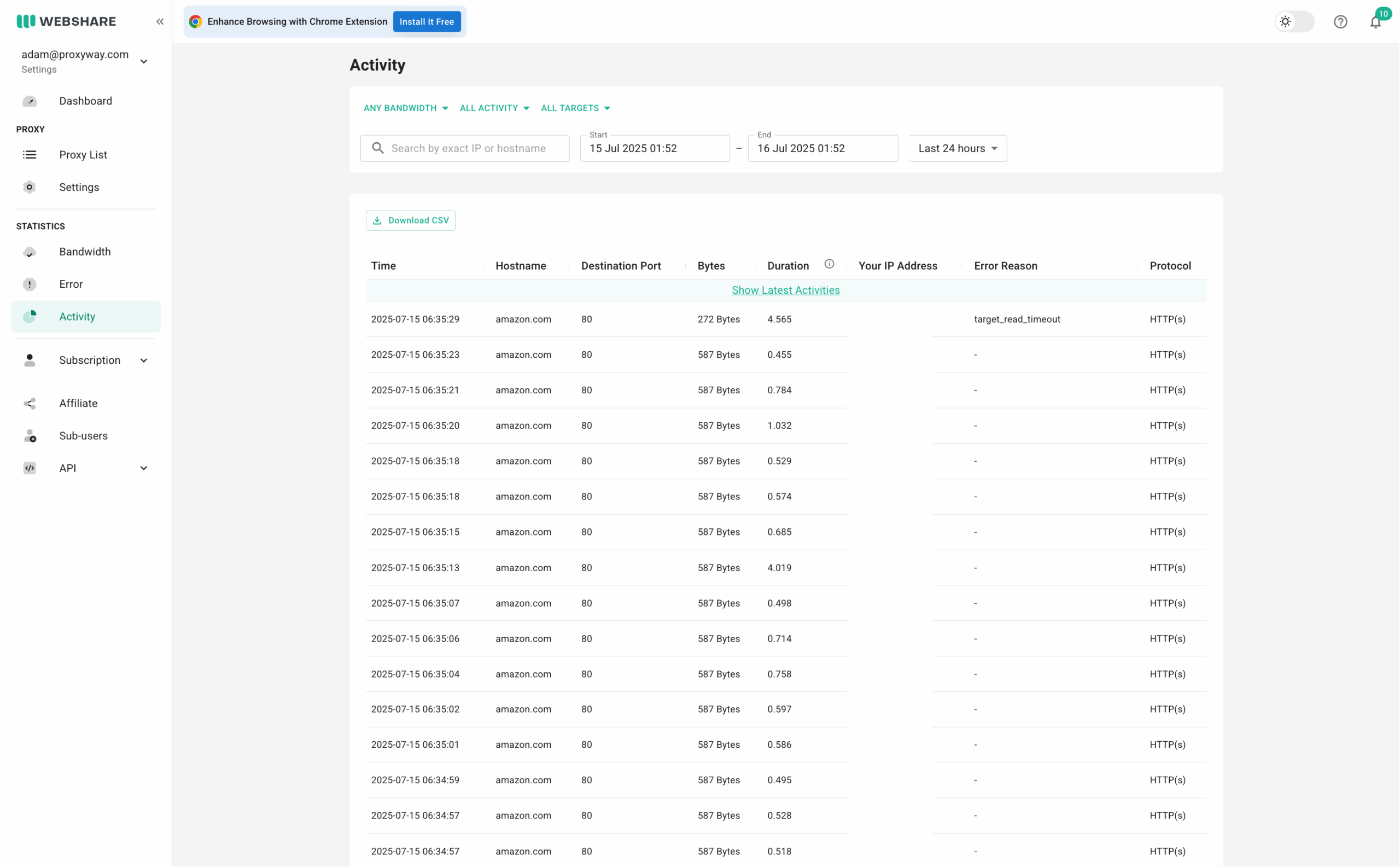
Webshare has amazing observability tools.
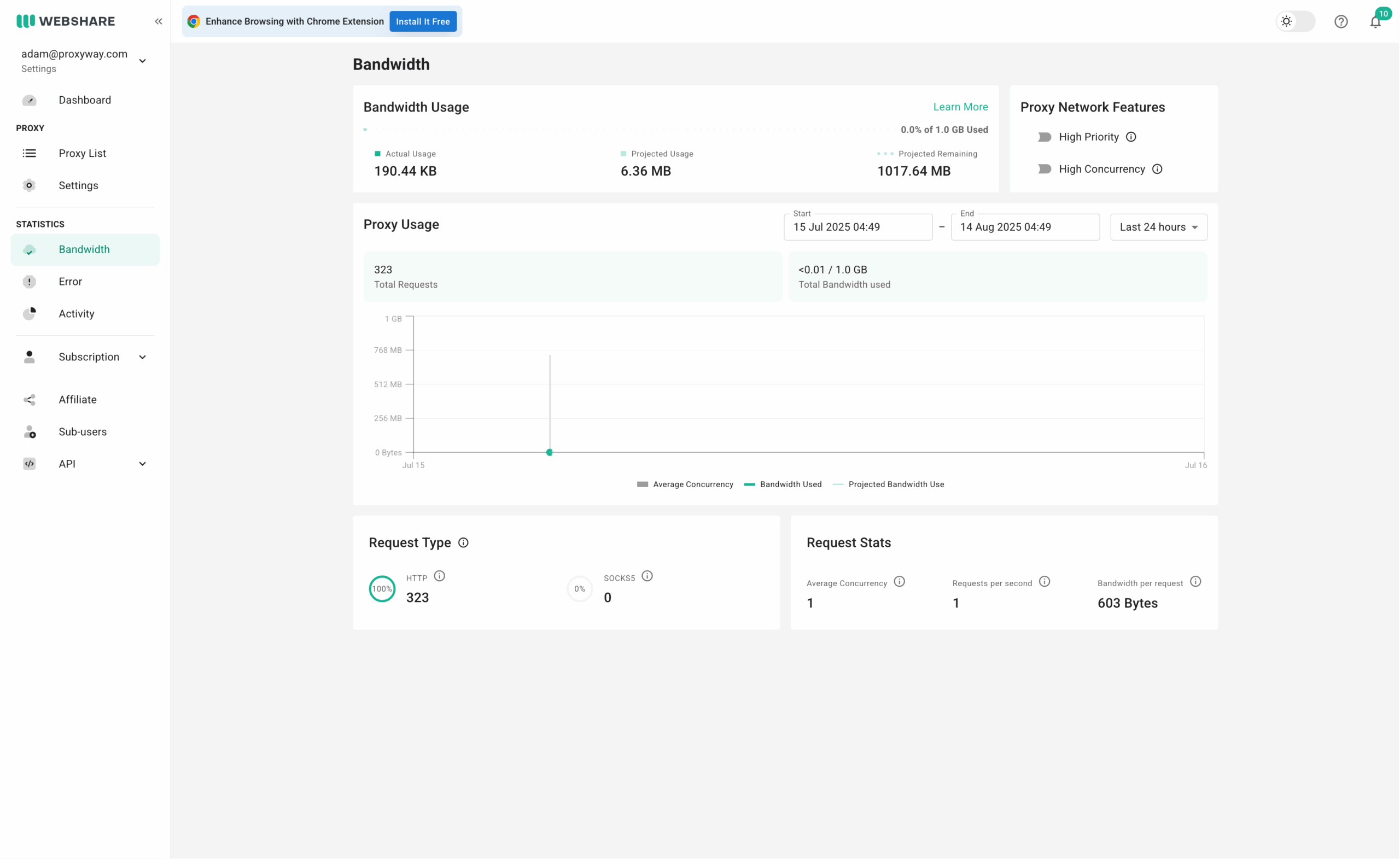
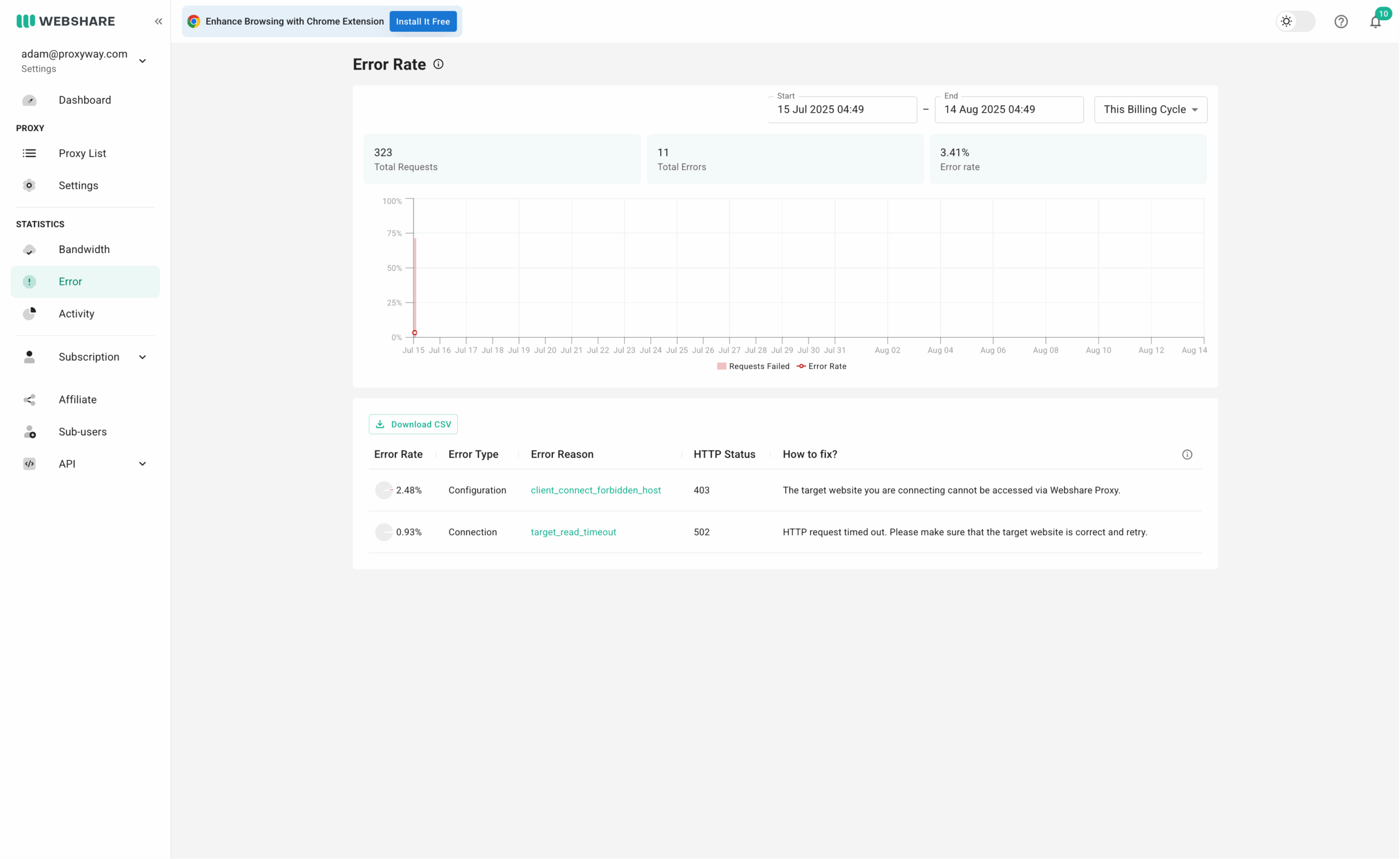
The home page offers a quick glance into main usage statistics: requests, traffic, and connection errors. You can then dive deeper into the metrics by exploring their dedicated pages.
- The Bandwidth page shows your actual and projected usage for the billing period. In addition, it displays the number or requests made through different connection protocols, average concurrency, requests per second, and bandwidth per request.
- The Errors page shows the rate of connection errors, their type, reason, status code, and even troubleshooting instructions.
- The Activity page shows request-level statistics with timestamps, targets, request duration, and more.
If you want to go even deeper, you can view the activity of individual IP addresses. This applies only for datacenter and ISP proxies.
Webshare lets you choose from pre-set timeframes (this billing cycle, last 24 hours, etc) or freely specify the duration going up to three months back.
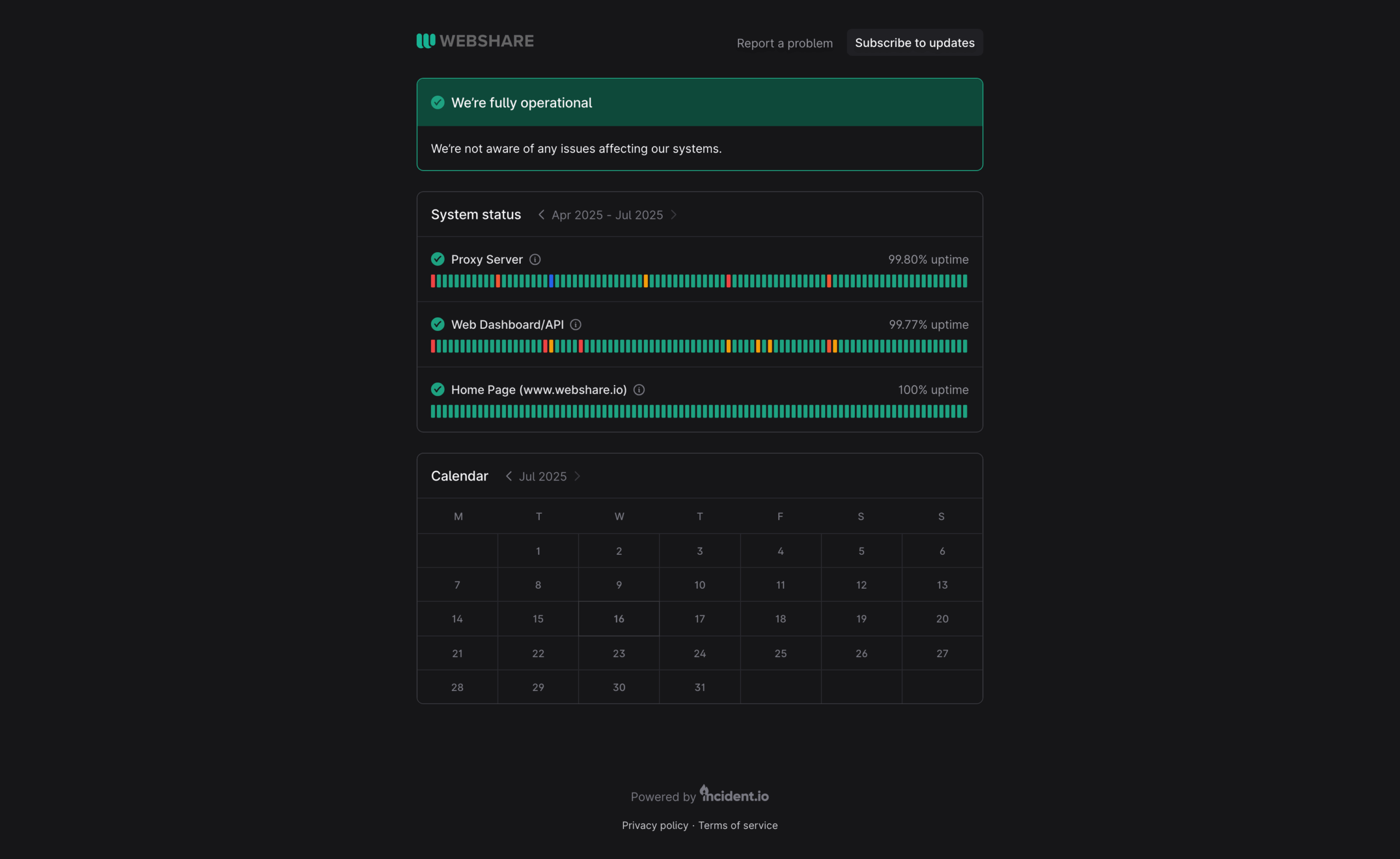
Finally, you can check for downtime using Webshare’s network status page.
API Access
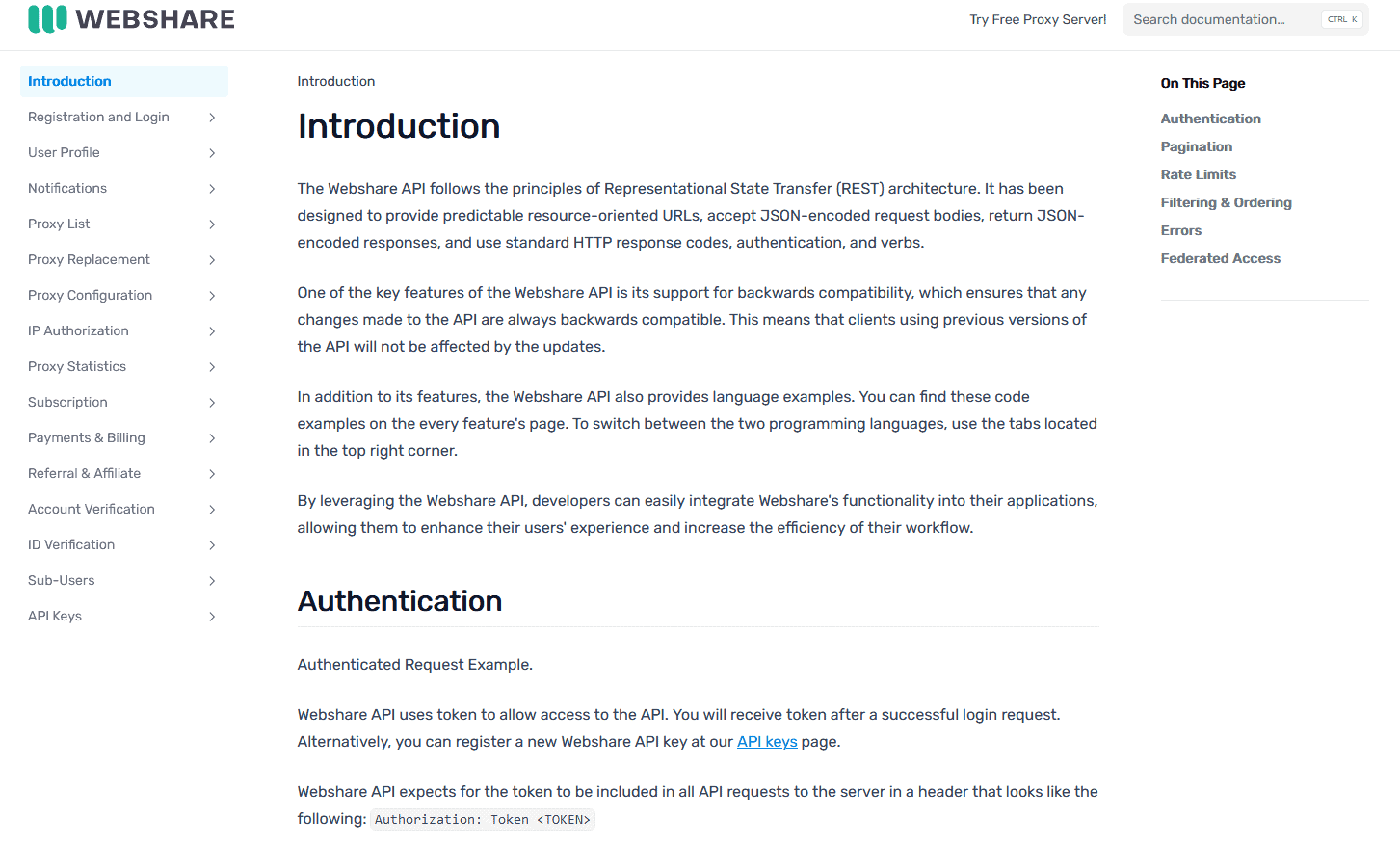
If you want to access your proxies programmatically, Webshare offers an API to every customer. The API comes with features covering all aspects of the service.
Its functions include registration and login, managing notifications, creating user profiles and sub-users, setting traffic limits, viewing proxy configurations, and more. The API provides code examples in cURL and major programming languages like Python and JavaScript.
Documentation
If you need help, your first resource should be Webshare’s Help Center page. It includes three sections: billing and payments, set up and proxy configuration, as well as proxy issues. Each has articles with answers and instructions.
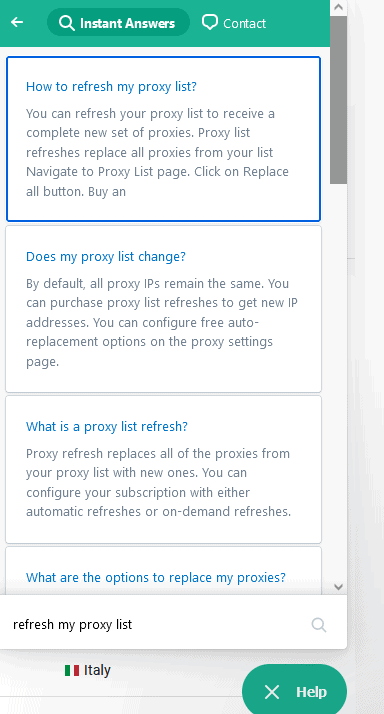
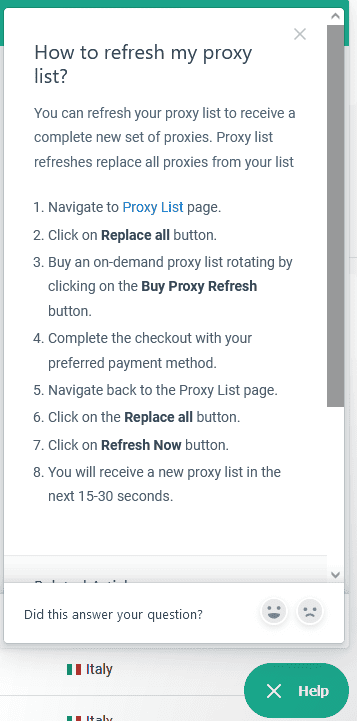
Else, there’s a Help button at the bottom of your dashboard. You can quickly find the same answers by typing your inquiry. For example, you can search for “refresh my proxy list” and get a list of suggested articles.
Hands-On Support
Customers can reach Webshare by email or live chat. The latter option appears only when logged in and has a chatbot as the first line of support. It’s available 24/7; if the bot fails to help you, the provider’s customer support agents work 24/5.
According to Webshare’s website, the agents responds to each request within 24 hours. That’s quite long if you’re having trouble using their services. However, we’ve found that at least for basic queries, the chatbot is actually useful at giving relevant answers.
Conclusion
Webshare’s key strengths include its flexible pricing model and powerful management tools.
The provider mainly focuses on datacenter and ISP proxy infrastructure, and this is where it shines. But even its residential proxy network can stand on its own against entry and mid-market alternatives.
Webshare tries to make the user experience as easy as possible, so even beginners will find the service fitting. But this comes out of necessity since there’s no 24/7 customer support.
Praises aside, Webshare lacks some features we’ve gotten used to. The residential proxy network has limited location and sessions settings, while the server-based products are constrained to country-level filtering. As such, it might not be the best option for location-sensitive use cases.
Otherwise, Webshare is one of the better entry choices in the market, especially if you’re looking for datacenter or ISP proxy servers.
Webshare Alternatives

Decodo offers a robust residential & mobile proxy infrastructure with more features. The service targets mid-sized customers and goes the extra mile for customer service.

Oxylabs’ service will treat you well if you’ve outscaled Webshare, need more features, or a more personalized touch. It’s the premium choice.

Rayobyte has a robust datacenter and ISP proxy infrastructure with city filtering and traffic-based formats. However, it’s pricier and the platform isn’t as robust.
Recommended for:
Anyone looking for affordable and fully-customizable proxy services.