

NodeMaven Review
There are plenty of residential proxy providers in the market. But NodeMaven presents itself as not just any provider: its proxies should persuade websites more consistently and last longer than regular residential IPs. This is all thanks to a rigorous quality filter.
Does it work well? Or rather: does it work at all? And where does NodeMaven stand compared to alternatives? Let’s find out!
Three-Minute Human Summary
- NodeMaven offers several kinds of proxy networks for people who need the best quality IPs. It likely resells proxies, but that doesn’t matter much, because NodeMaven’s main value is the quality filter it puts on top.
- The provider’s residential & mobile proxies have precise filtering options (such as city + ISP), support for sub-users, and several strictness levels for judging IP quality.
- The residential proxy network was about average in size (with 345k US IPs out of 1.2M requests), had okay infrastructure success rate and latency. However, some of the connections were slow because the provider chose not to exclude IPs on bad networks. Note that the quality filter affects only sticky sessions – enabling it nominally reduced our Scamalytics risk score.
- NodeMaven costs more compared to alternatives like Decodo or Webshare. In exchange, you get NodeMaven’s quality filter, scaling pay as you go, monthly cashback reaching up to 10%, and a quality guarantee that pays you for bad proxies. The latter sounds a little gimmicky.
- The dashboard is comfortable to use and presents detailed usage stats. It would benefit from automated top-ups, though.
- Overall, NodeMaven has enough going for it that you might want to consider this provider even if you won’t benefit from the quality filter.
News about NodeMaven
-
By Adam Dubois
- Provider News
-
- Provider News
General Information
- Country: Estonia
- Founded: 2023
- Employees (LinkedIn): 25-50
- Proxy networks: Residential, mobile, ISP
- Supporting tools: Bandwidth checker
- Price segment: Mid-market
- Starting price: $5
- Payment methods: Credit card, cryptocurrencies
- Trial: Available for $3.5
NodeMaven is an Estonian proxy provider founded in mid-2023. It mainly sells access to peer-to-peer proxy networks. In December 2025, the provider expand its roster with static ISP proxies.
NodeMaven is one of the specialized providers, meaning that it targets a particular niche of customers. In particular, we’re talking about affiliate marketers, social media managers, and the like. The ideal customer profile is probably small to medium operations looking for better quality IPs to achieve their goals.
NodeMaven’s focus makes a lot of sense once you get to know its background. The project is run by the people behind Multilogin, one of the most popular antidetect browsers. Both tools go hand-in-hand with one another.
The provider gives little information about its IP sourcing practices. It’s safe to assume that most (if not all) of the proxies are whitelabeled from another source. But that’s not the point – NodeMaven’s main value is the quality layer it puts on top. We’ll explore it soon enough.
As a company, NodeMaven is not that small: it has over 25 members on LinkedIn. Because the HQ is in Estonia, we also have public revenue figures. In 2025, the provider reached over €1.3M in revenue.
The main thing that throws shade on NodeMaven is the use cases it serves: they include gray areas like account management, traffic arbitrage, crypto airdrops, and farming points on platforms like Grass. Well, that and the fact that there’s no KYC procedure; but this part is probably handled by the upstream proxy source.
NodeMaven Proxy Networks
NodeMaven offers three types of proxy servers: residential proxies, peer-to-peer mobile proxies, and ISP (static residential) proxies.
Both the residential and mobile proxy pools are accessible under one subscription, so we’ll be covering them together.
🏠 Residential & Mobile Proxies
NodeMaven’s residential and mobile proxies share the same system, meaning they have identical features. Even the pricing is the same, and you can freely toggle between these networks on the dashboard.
The only difference is that the mobile proxy pool is smaller (10 million as opposed to 30 million advertised IPs).
- Advertised pool: 30M IPs
- Countries: 150+ with state, city, ASN/ISP, ZIP targeting
- Rotation: Every request, customizable sessions
- Other features: IP quality, speed, pool size, protocol filters
- Starts from: $8.5 for 2 GB ($4.25/GB). Scaling pay as you go available
- Advertised proxy pool
- Residential: 30 million IPs
- Mobile: 10 million IPs
- Countries: 195+
- Integration method: Gateway address
- Filtering
- Random: ✅
- Country: ✅
- City: ✅
- ASN/ISP: ✅
- Other: State, ZIP code, IP quality, speed, pool size, IP protocol (IPv4 only/mixed)
- Rotation
- Every request: ✅
- Sticky sessions: ✅ (custom duration, as long as available)
- Session behavior: New IP after disconnect or strict sessions
- Protocols
- HTTP: ✅
- HTTPS: ❌
- SOCKS5: ✅ (+ UDP)
- Authentication
- Credentials: ✅
- IP whitelist: ✅
- Sub-users: ✅
- Concurrency: Unlimited threads & ports
- Traffic: Plan based
NodeMaven’s advertised pools are modest by today’s numbers (some providers go as far as to claim 300+ million IPs), but they’re well equipped. You’ll be able to target most of the globe and filter your requests down to the city & ASN level. It’s nice that NodeMaven shows IP availability (high/medium/low) for each location on the dashboard.
The provider offers some other neat filters. One is the ability to control the IP protocol. Others let make the proxy pool faster or more populous.
However, NodeMaven’s main selling point optimizes the pool for IP quality – you get three levels, each with stricter selection criteria. The levels serve different purposes:

When you enable this feature, NodeMaven’s algorithm runs the IP through popular checkers and databases, removing proxies that fail to reach a certain threshold.
The dashboard’s setup widget lets you choose between no filter or the medium mode. The other options are discoverable through documentation. Note that the filter only works with sticky sessions enabled – you won’t benefit from it when web scraping or doing other tasks that require fast rotation.
Speaking of, you get several rotation options ranging from every request to freely customizable sessions. There’s also what NodeMaven calls super sticky sessions – they’re supposed to keep the proxy alive for up to 24 hours.
Both authentication methods are available, and you can use SOCKS5, though probably not to its full extent.
- Model: Pay as you go, subscription (monthly plans)
- Format: Traffic
- Modifiers: –
- Starting price: $8.5 for 2 GB ($4.25/GB)
- Trial: $3.50 for 750 MB, pro-rated refund
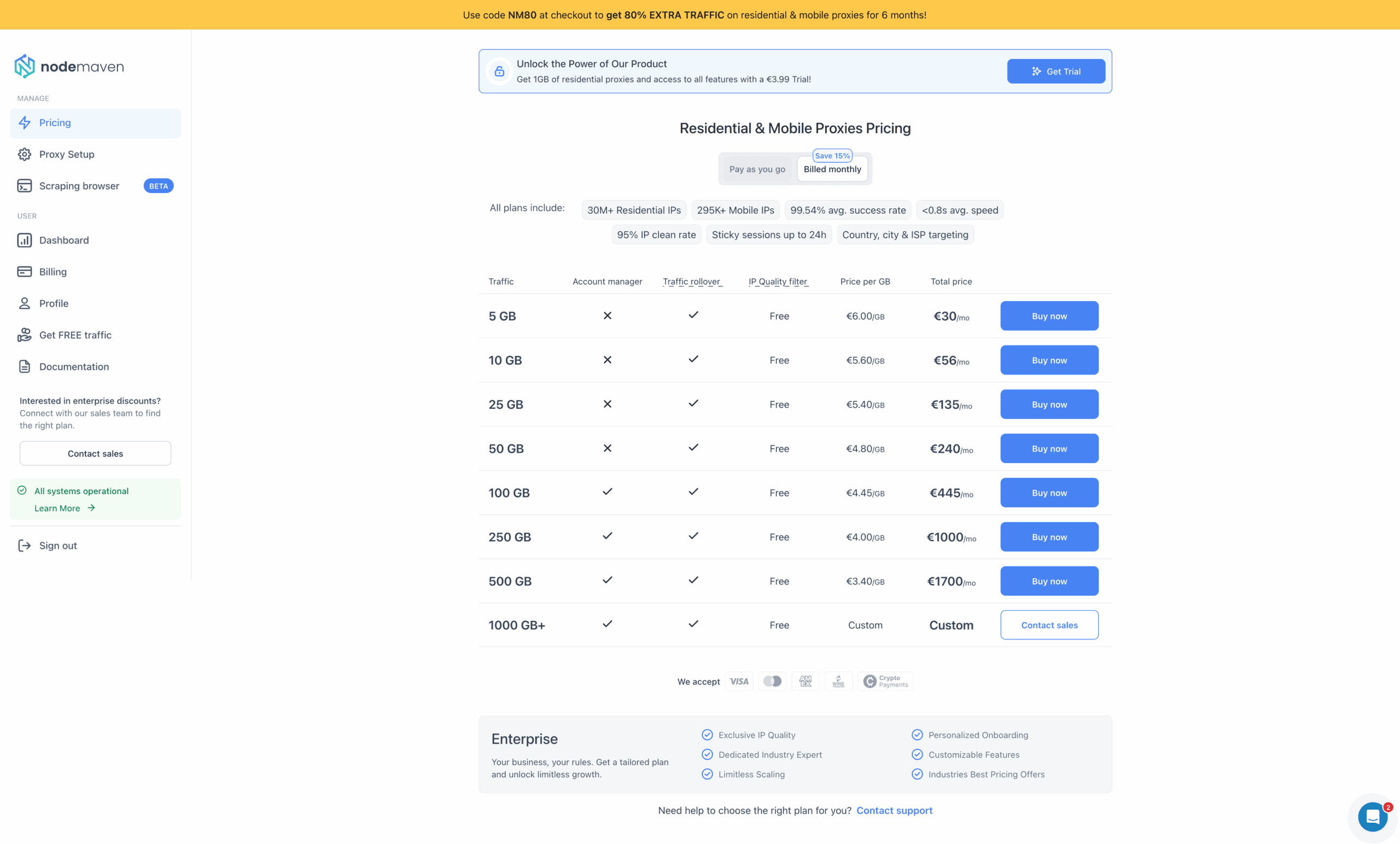
NodeMaven offers two pricing models. You can choose to pay for traffic once, with better rates when buying in bulk, and use it for as long as you like. Or, you can subscribe to a plan for 15% extra savings.
It’s interesting that the subscription traffic also never expires; however, it freezes once you stop paying and frees up after you re-subscribe.
NodeMaven’s public plans range between 2 and 1,000 GB, so they’re geared toward a wide range of businesses. You’re free to buy more traffic at any time (at least 5 GB), but it’s not possible to freely jump between PAYG and subscription – the pay-as-you-go traffic will disappear.
NodeMaven’s public pricing plans (/GB)
| PAYG | Subscription | |
| 2 GB | $5 | $4.25 |
| 8 GB | $4.88 | $4.00 |
| 20 GB | $4.50 | $3.75 |
| 40 GB | $4.10 | $3.45 |
| 55 GB | $3.73 | $3.18 |
| 100 GB | $3.45 | $3.00 |
| 200 GB | $3.25 | $2.85 |
| 450 GB | $2.92 | $2.60 |
| 1,000 GB | $2.45 | $2.20 |
NodeMaven charged more compared to major alternatives in its pricing range. Taking into account the non-expiring traffic and the quality filter, one could argue that this premium is justified.
In addition, you get cashback each month for using traffic. It starts at 5% and reaches 10% at 500 GB or more. For example, if you spend 750 GB, you’ll receive extra 75 GB at the end of the month. This traffic never expires.
Finally, NodeMaven’s quality guarantee pays you $1 in traffic every time a proxy fails to perform, using PixelScan as the judge. The application process is tricky: it requires contacting the customer support, sending a screenshot, and waiting for manual review.
You can get a paid 1 GB trial, which doesn’t really sound like a trial – and a refund, which is actually very generous: NodeMaven will return money for the amount of traffic you haven’t used.
Standardized pricing comparison (residential proxies)
We last tested NodeMaven’s residential proxies in April 2026.
Pool size & composition
| Gateway | Requests | Unique IPs | Residential %* |
| Global | 3.6M over 21 days | 1,954,389 | 98.94% |
| US | 1.2M over 14 days | 345,868 | 99.24% |
| UK | 560k over 14 days | 144,303 | 99.62% |
| EU** | 1.2M over 14 days | 311,196 | 99.16% |
| Brazil | 560k over 14 days | 222,340 | 99.14% |
| India | 560k over 14 days | 189,746 | 98.24% |
| Australia | 140k over 7 days | 23,580 | 99.05% |
* IP2Location database, Usage type data point (ISP, ISP/MOB, MOB IPs)
** Combines Germany, France, Spain, Italy, the Netherlands.
Top 10 countries in the Global pool

Comparison with other providers
NodeMaven’s residential proxy network was average in size: it kept up with Infatica but was quite a bit smaller compared to Webshare or Byteful. Without any filters applied, the most popular locations by a wide margin were the US, Russia, and Brazil.
Infrastructure success rate
Requests: Same as the pool test
Target: Nearest server of a global CDN
| Gateway | Avg. success rate |
| Global | 96.29% |
| US | 99.00% |
| UK | 99.16% |
| EU | 99.14% |
| Brazil | 98.13% |
| India | 98.33% |
| Australia | 99.42% |
Comparison with other providers
Should we only look at NodeMaven’s results in individual country pools, we could claim that its infrastructure failed very rarely. However, nearly 4% of our requests failed to reach their target when we applied no filters at all, which isn’t ideal.
Infrastructure response time
Requests: 6 KB page size – same as the pool test, 2 MB page size – 5,000
Target: Nearest server of a global CDN
6 KB page size
| Gateway | Avg. | Median | P95 |
| Global (🇩🇪 -> any IP) | 1.35 s | 0.94 s | 4.52 s |
| US (Ashburn -> 🇺🇸 IP) | 1.03 s | 0.66 s | 3.32 s |
| UK (🇩🇪 -> 🇬🇧 IP) | 0.70 s | 0.36 s | 2.11 s |
| EU (🇩🇪 -> 🇩🇪/🇪🇸/🇫🇷/🇮🇹/🇳🇱 IP) | 0.67 s | 0.36 s | 1.80 s |
| Brazil (Ashburn -> 🇧🇷 IP) | 1.36 s | 0.95 s | 3.46 s |
| India (Singapore -> 🇮🇳 IP) | 1.22 s | 0.88 s | 3.64 s |
| Australia (Singapore -> 🇦🇺 IP) | 1.13 s | 0.94 s | 2.28 s |
2 MB page size
| Gateway | Avg. | Median | P95 |
| Global (🇩🇪 -> any IP) | s | s | s |
| US (Ashburn -> 🇺🇸 IP) | s | s | s |
Comparison with other providers
6 KB page size, average response time
NodeMaven was in the slower half of the providers we’ve benchmarked. That said, we could hardly call its infrastructure sluggish, and even Asian locations connected relatively fast.
On the downside, NodeMaven wasn’t very strict in filtering out slow proxies, which is why the slowest requests (P95) took a long time to connect.
IP quality (Scamalytics)
Checks: 1,000 per configuration
| Global pool risk score (Avg / Median) | US pool risk score (Avg / Median) | |
| No IP filter | 3.38 | 10.87 |
| Medium IP filter | 2.59 | 9.79 |
Nodemaven’s IP filter on a medium setting decreased the risk score a bit – but the drop wasn’t meaningful, and the score wasn’t bad in the first place.
- Basic request: USERNAME:[email protected]:8080
- Using filters: USERNAME-country-us-region-california-city-los_angeles-isp-t_mobile_usa-filter-medium:[email protected]:8080
- Using sessions: USERNAME-sid-ID-ttl-2m30s:[email protected]:8080
- Using IP whitelisting: gate.nodemaven.com: 8081, 8082, 8083…
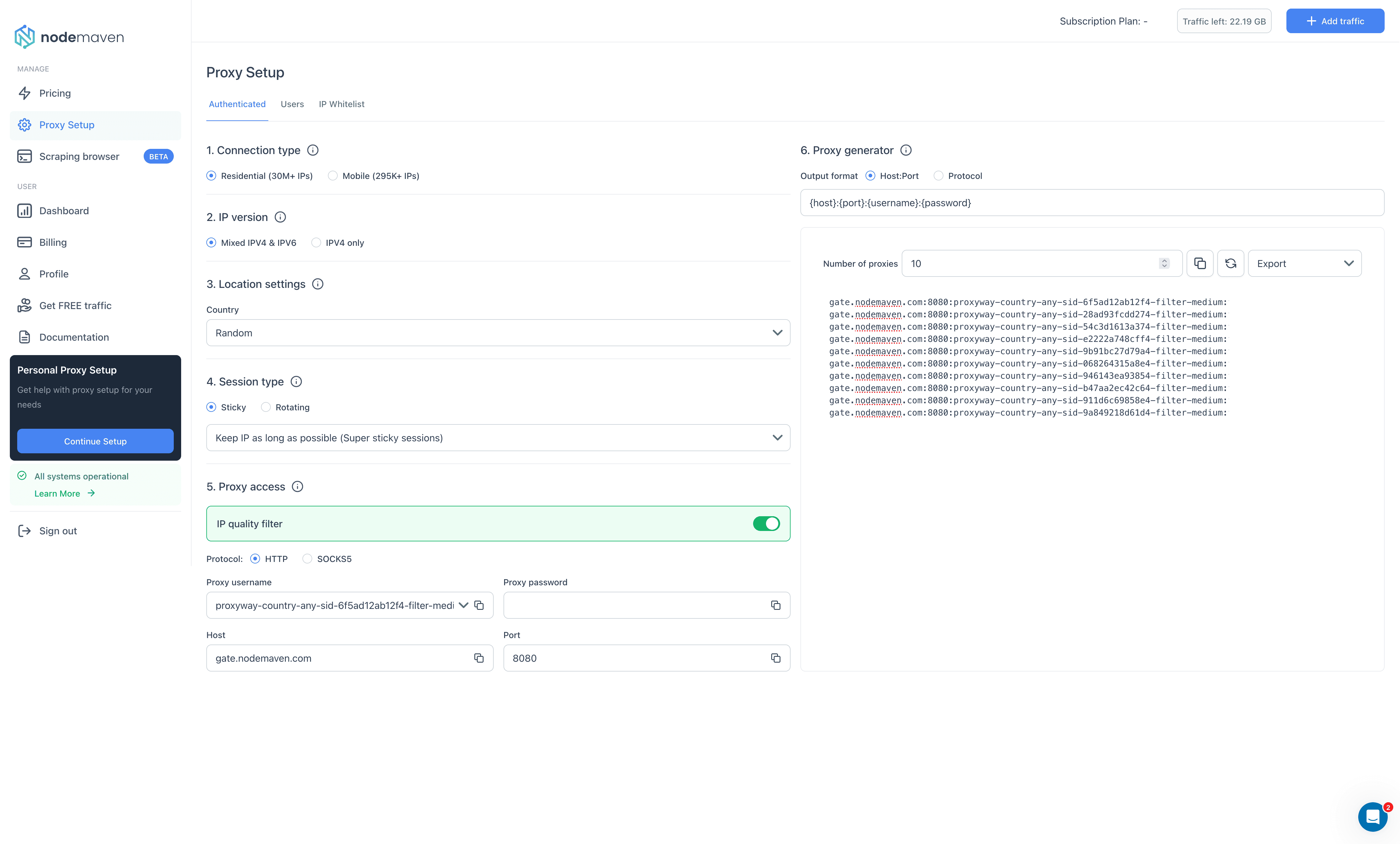
NodeMaven’s residential proxies are configured by adding parameters to the username. This applies both to location settings and sticky sessions. The address always remains the same, and the port changes only when switching to a different protocol.
That is, if you’re authenticating with credentials. NodeMaven also offers fully-fledged IP whitelisting functionality. The system lets you add and save namable configurations on the dashboard, binding them to one or more ports. You can employ up to 1,000 ports for this task, for example, assigning 50 to sticky proxies in the UK, and another 250 to US IPs.
🏠🏢 ISP (Static Residential) Proxies
- Formats: Dedicated list
- Countries: 8 in four continents
- Rotation: Static
- Starts from: $5 for 1 IP
A full review isn’t available for this product yet. 🙁
How to Use NodeMaven
Registration
To register with NodeMaven, you’ll need an email address and password. The provider will then ask you to confirm the registration by email. Alternatively, it’s possible to use a Google account.
Just like the provider writes in its sign-up form, it does take less than a minute.
KYC and Usage Policies
As far as we know, NodeMaven doesn’t have a KYC procedure. However, as with all residential proxy providers, don’t be surprised to find your account suspended if you do something fishy.
The description of usage policies is also laconic. The provider prohibits opening bank, payment service, educational, government domains – and, of course, mailing ports. For some reason, news websites are also banned. There’s no information whether you can unblock anything from this list.
Dashboard
NodeMaven has a dashboard for all touchpoints with its service. It will let you buy a plan, download invoices, set up proxies, track usage, and contact the customer support. The dashboard is available in English only.
Nodemaven sells few products, so its dashboard layout is straightforward.
You get two sections: Manage for acting (buying traffic, setting up proxies, using Scraping Browser), and User mostly for viewing information (statistics, billing, account settings). There’s also a button for live chat on the bottom right.

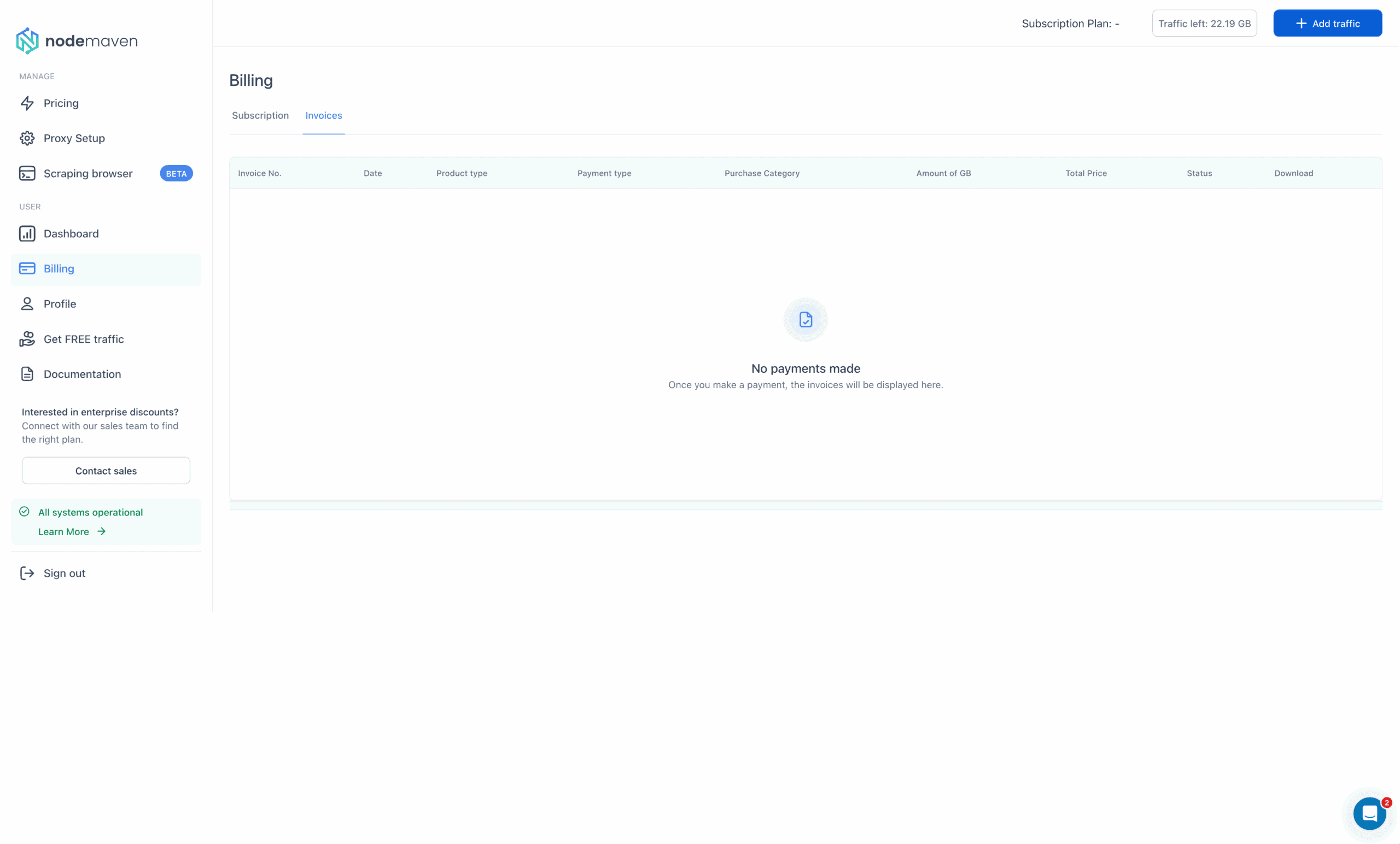
NodeMaven’s subscription management tools are simple: there’s a page for buying traffic, a page for tracking active subscriptions, and a page for invoices. The dashboard lacks a wallet, ability to save payment details, and our pay-as-you-go package had no way to top up automatically.
Platform access
Access management here mostly revolves around using proxies. There are few dashboard tools: no multi-access roles, event tracking, or 2FA. The only real actions you can do are change your password and (re)generate the API token.
Proxy access
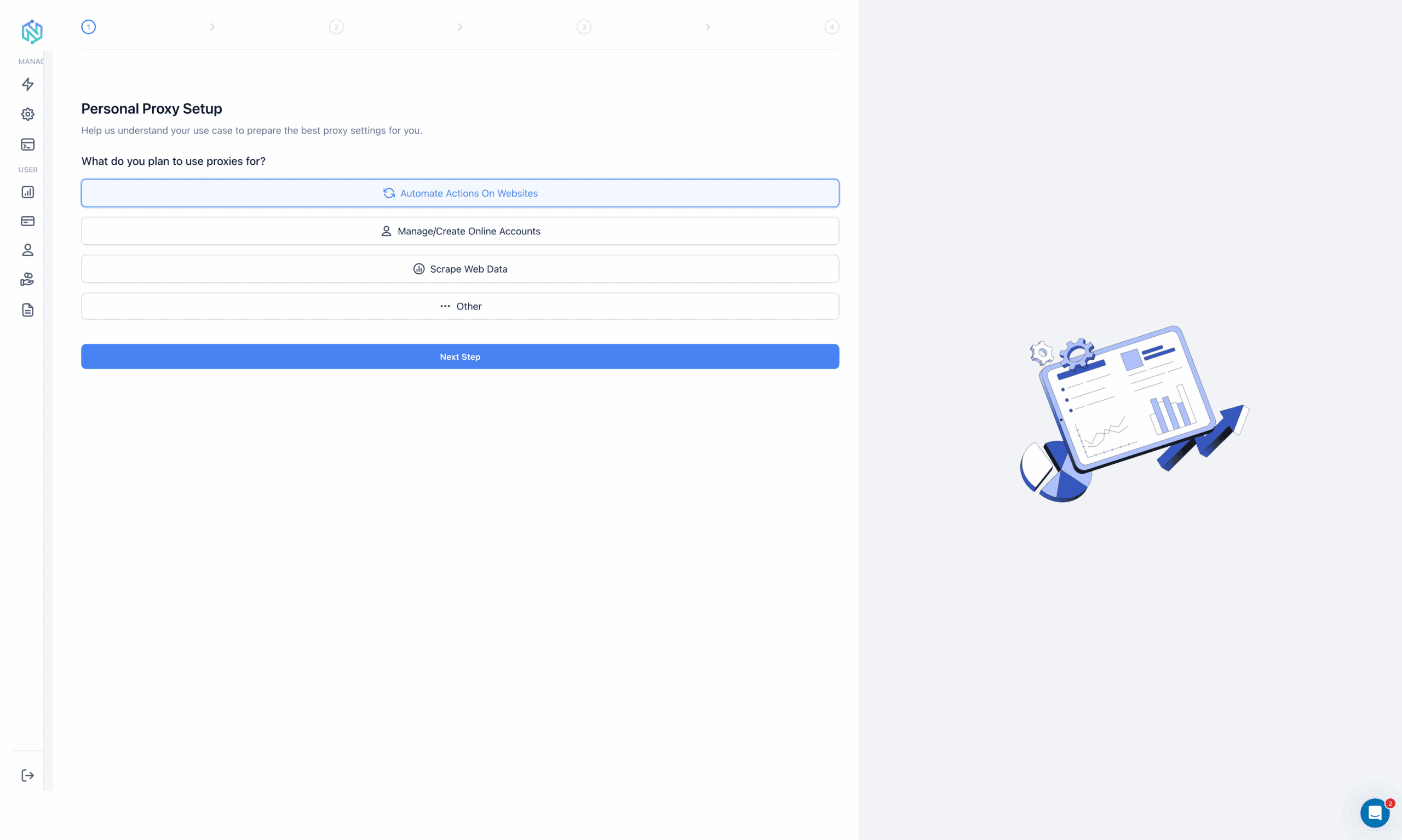
Having said that, NodeMaven’s proxy setup experience is really nice. You can choose to complete a personal proxy setup widget, which recommends the best setup, or go directly to the widget. There, you’ll be able to apply filters and generate proxy lists.
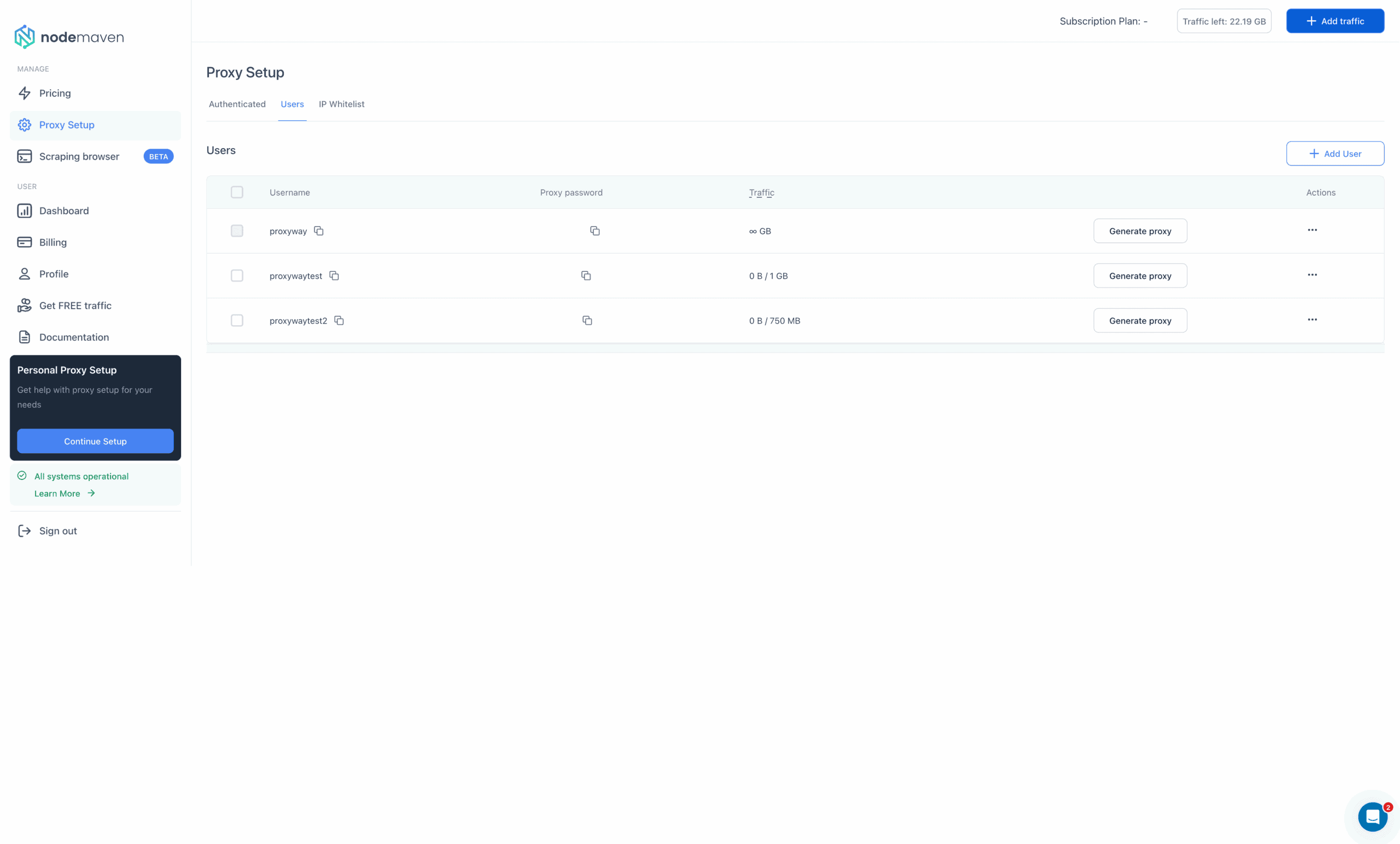
The same section includes sub-user management functionality where you can create, modify, and assign traffic limits to users. The IP whitelisting page is well thought out, too, at least compared to other implementations.
We’re just not sure why the provider shows code snippets in the setup wizard but not in the widget.
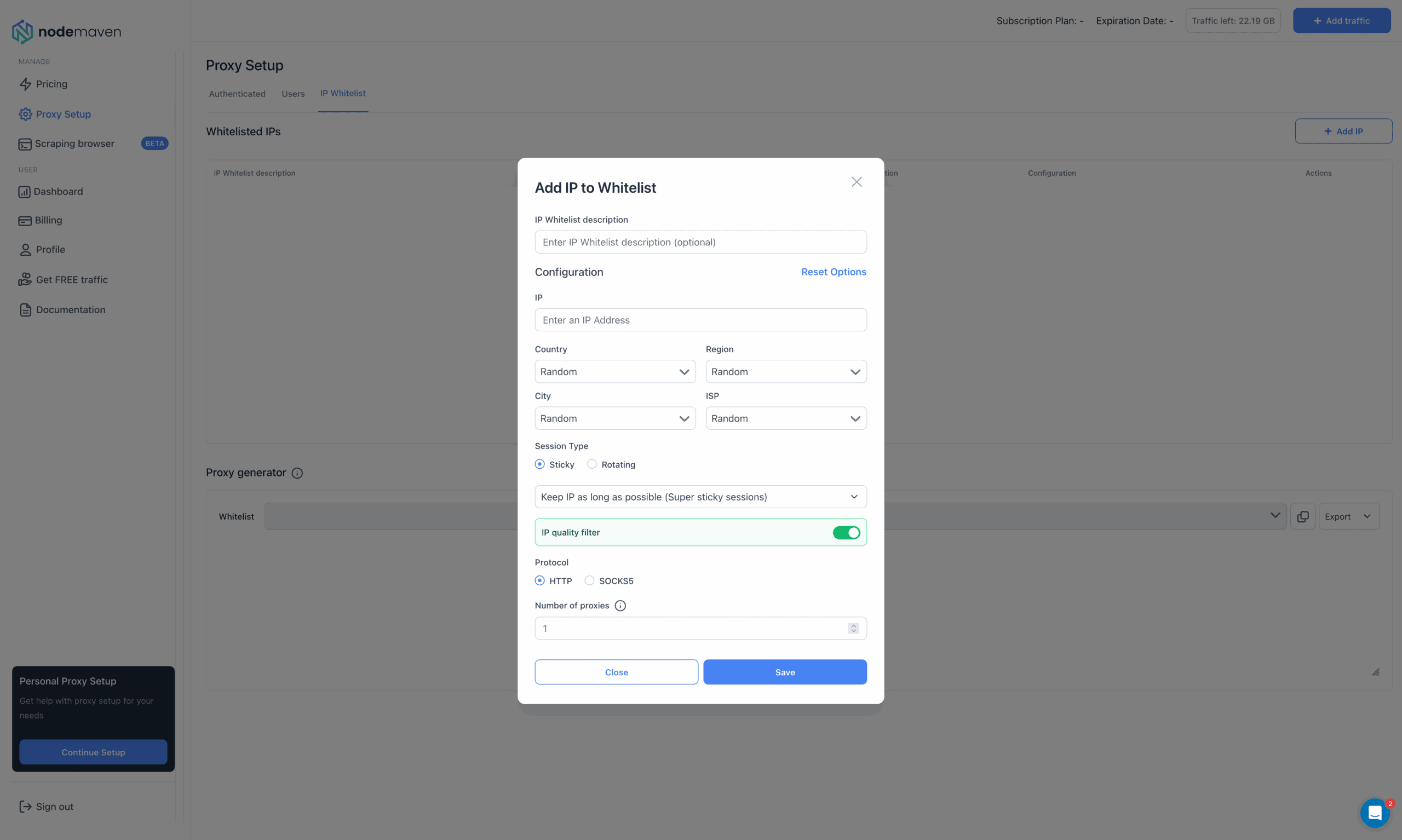
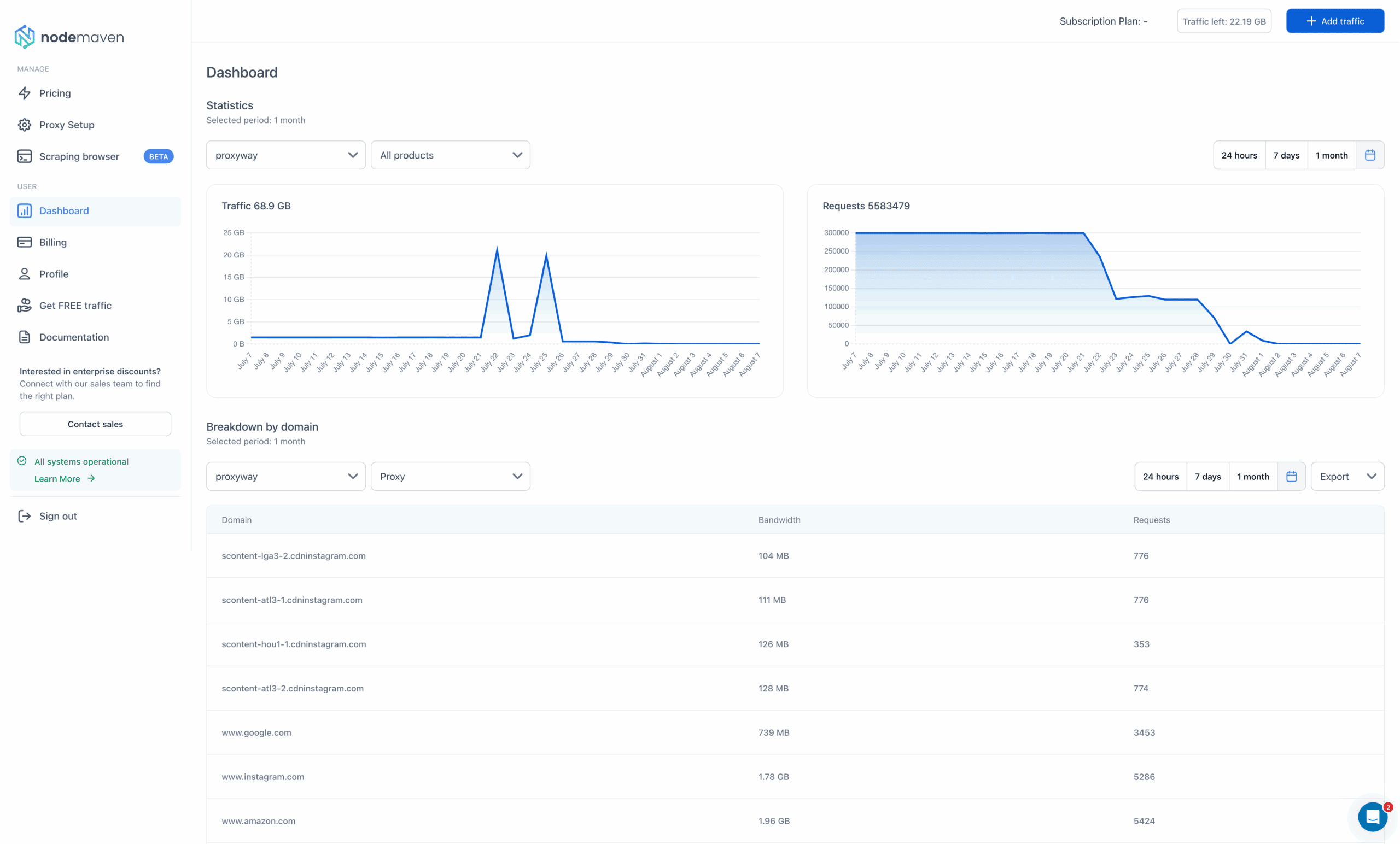
NodeMaven’s usage tracking tools include two charts and a table. They can show traffic and request expenditure in total, per sub-user, or per domain.
There are several time presets, and it’s possible to select custom dates going back to three months. The stats reflect usage nearly instantly, but the briefest period is 24 hours, which limits their utility for close inspection.
API Access
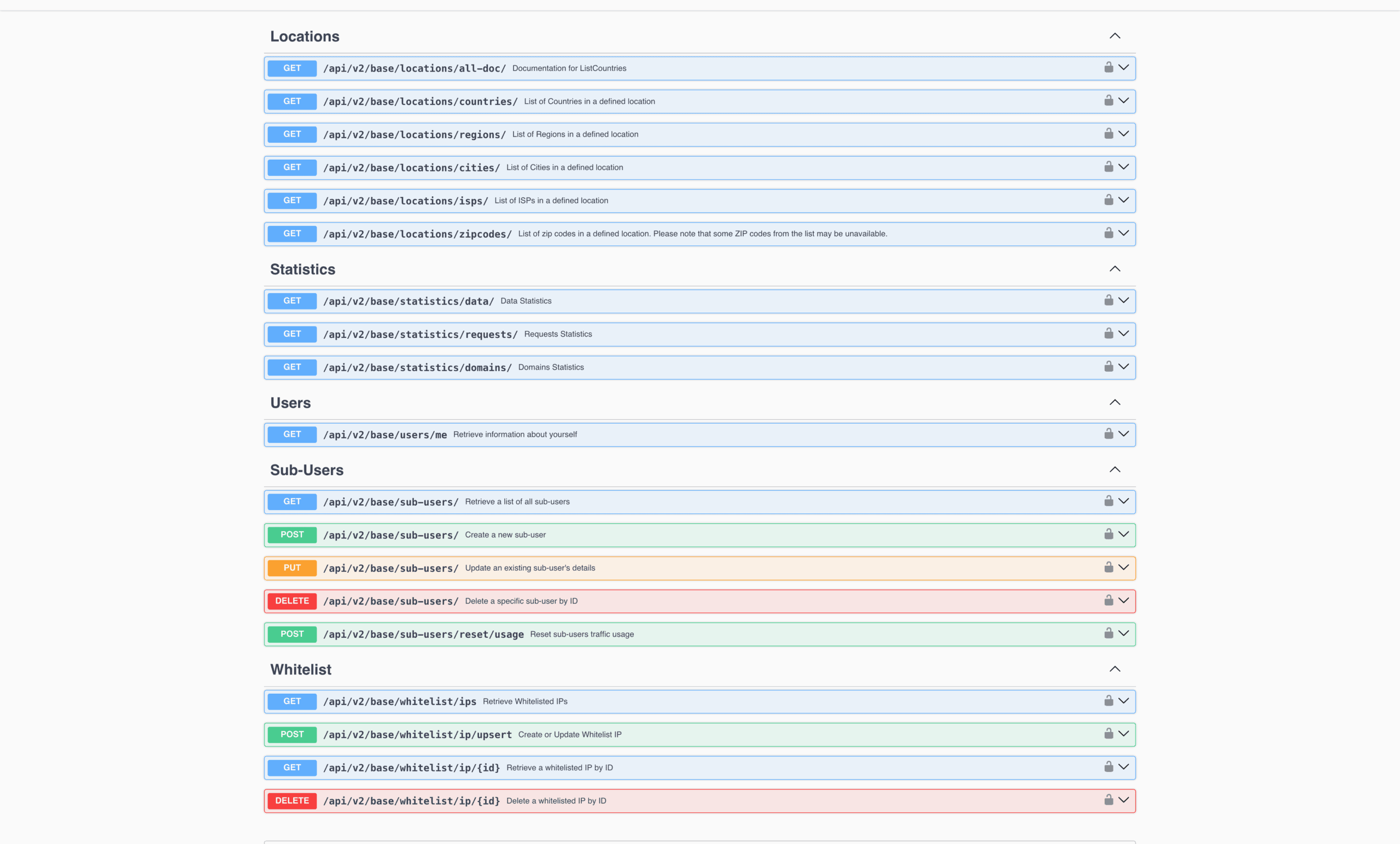
It isn’t obvious, but NodeMaven has an API for programmatic access. The API is well developed: it offers endpoints for user management, statistics, and information about available filters.
Documentation
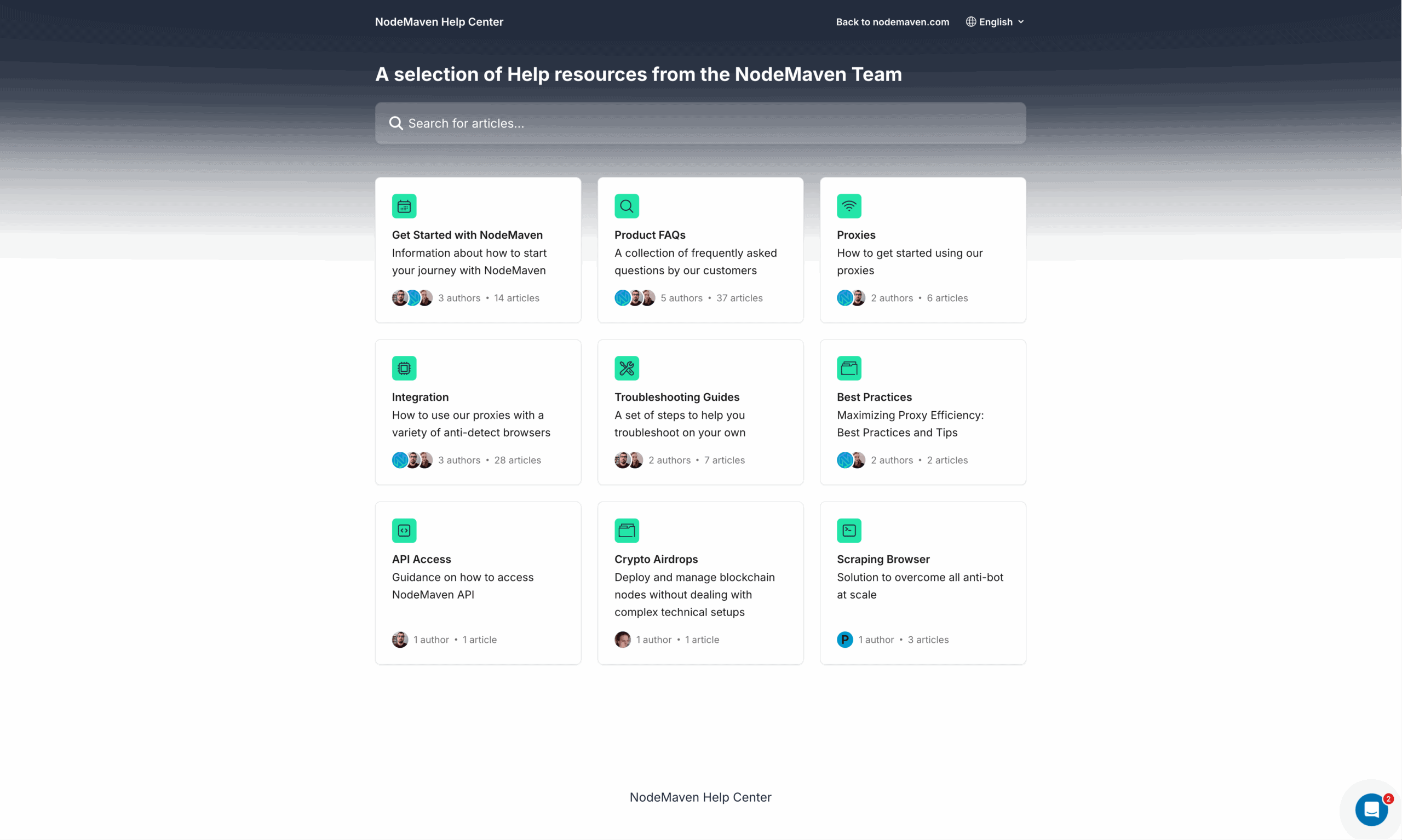
For documentation, NodeMaven has a help center divided into multiple sections by topic. It includes introductory information, overview of available functionality, troubleshooting articles, and even suggestions for other relevant tools like virtual credit cards.
The help center also includes integration examples, though they’re all static and focus on various stealth browsing tools like antidetect browsers.
The documentation is by no means bad or lacking. But nowadays, many providers have moved on to Gitbook and similar layouts, which we personally find more comfortable.
Hands-On Support
NodeMaven provides 24/7 customer support over live chat. After first opening the chat, you get a list of often-encountered questions – you can select one or just start writing your own. The live chat is based on Zendesk, so it integrates with email and lets you download the transcript.
We contacted NodeMaven’s support during daytime in Europe. A human agent appeared within a minute and answered several basic queries scary fast. Overall, we were happy with the experience.
Conclusion
NodeMaven has a lot to like: its proxy network performs competitively, includes hundreds of thousands of IPs, bundles both mobile and residential addresses, and wraps everything in a nice package.
At the same time, its defining feature, the quality filter, fails to work in any scenario that doesn’t need sticky sessions. And at this price point, there’s tough competition from providers like Decodo and SOAX.
Nonetheless, we see NodeMaven as a strong option for small to mid-scale use, even when it falls outside the company’s target segment of multiple-account managers.
NodeMaven Alternatives

Decodo is a strong alternative to NodeMaven. It offers similar performance, great user experience, and a bigger pool – but the traffic expires.

IPRoyal can offer you a self-sourced residential proxy pool and better non-expiring traffic – but likely worse IP quality.

Like NodeMaven, SOAX gives access to all proxy types with one subscription. Its proxies perform very similarly and include useful pool filters.
Recommended for:
Multiple account managers who want to feel more assured about their proxies.

